
This post contains affiliate links. We may earn a small commission when you buy through our links — at no extra cost to you.
A foldable keyboard that disappears into your bag is a great feeling — until the spacebar stops working three months in. That’s the reality of many travel keyboards: portability often comes at the cost of long-term reliability. This guide focuses on models that actually balance both.
The trade-off is baked into the design. A tri-fold gives you a full numeric pad but adds hinge stress; a bi-fold is lighter but squeezes the key layout. Knowing which combination matches your typing habits and travel frequency turns a potential frustration into a tool that earns its space in your carry-on.
Whether you need a full-size layout for spreadsheets on the road or a pocketable mini for quick notes, the right choice depends on how you actually type — not just how small it folds.



Best for Travel Typists
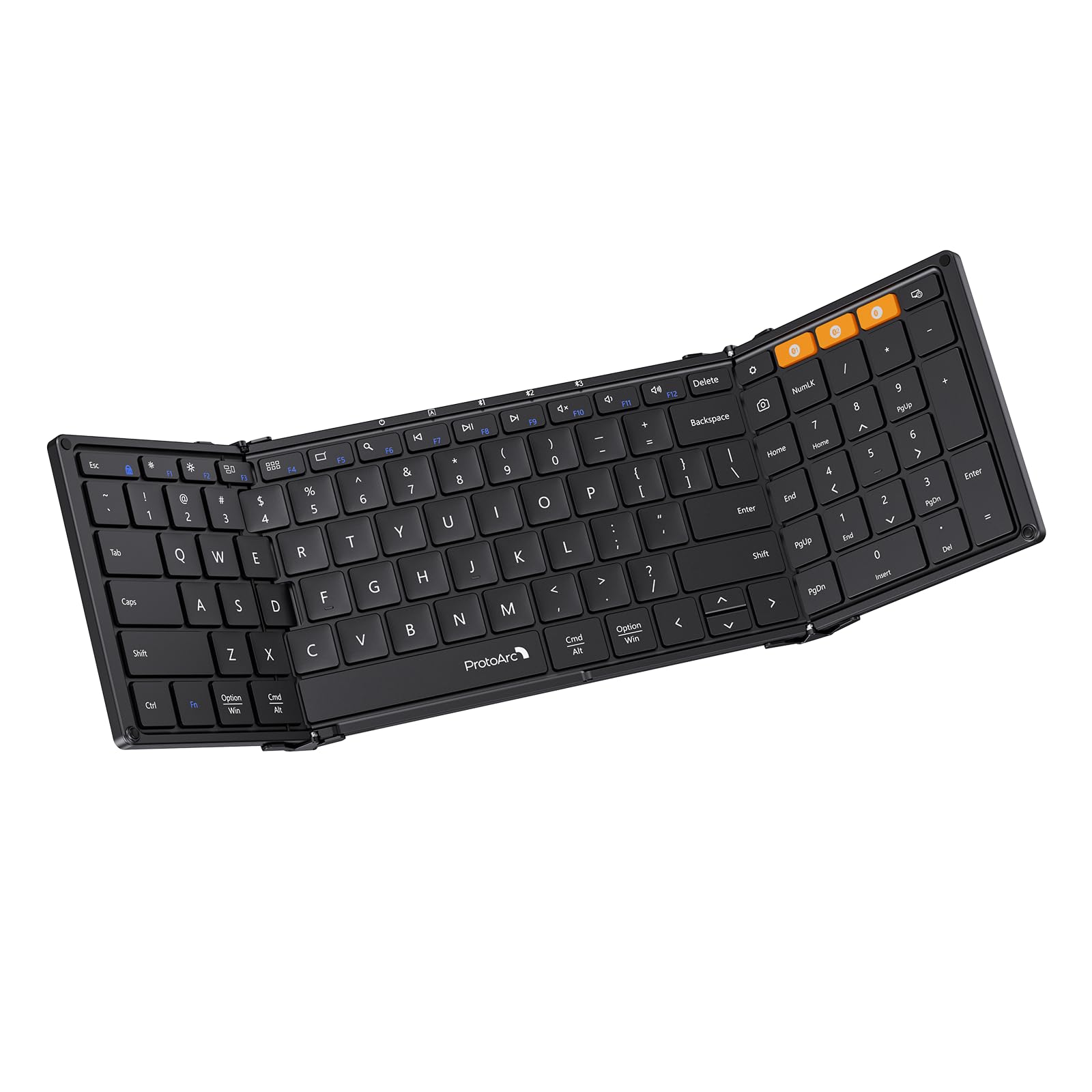
ProtoArc XK01 Foldable
Key Features
- Folding Type: Tri-fold
- Key Layout: Full-size w/ numpad
- Connectivity: Bluetooth 5.1
- Battery: USB-C, 150-day standby
- Price: Budget
Folding down to a slim 297-gram package that fits in a jacket pocket or side compartment of a daypack, the XK01 delivers a desktop-like typing experience on the road. The tri-fold design opens to a 105-key layout with a dedicated number pad, making number-heavy work like spreadsheets or accounting possible without cramped fingers. Paired with Bluetooth 5.1, connecting to a laptop, tablet, or phone takes seconds, and switching between three paired devices is a tap away.
The battery holds a USB-C charge for extended periods — the 150-day standby claim holds up in practice for intermittent travel use. Where the XK01 stands apart from pricier alternatives is that it skips extras like a touchpad or backlight and focuses on the essentials: a spacious, full-size key arrangement and reliable wireless connection. For someone who types all day and needs that numeric row, this layout is a genuine productivity aid, not a compromise.
This keyboard suits travelers who need a full-size workspace without the bulk, and budget-conscious buyers who want a familiar layout for typing-heavy tasks. The tradeoff is long-term durability: some units have shown key registration issues after several months, and the flat typing surface lacks any tilt, which can cause wrist fatigue during extended sessions. For occasional typing or users who can work with a neutral wrist position, these limitations are manageable.
Pros
- Tri-fold design collapses to pocketable size while keeping full key spacing
- Dedicated numeric keypad for spreadsheet and data entry work on the go
- Bluetooth connects seamlessly to three devices with a single switch
- Long battery life with USB-C charging handles weeks of typical use
Cons
- Flat surface with no tilt option may cause wrist strain during long typing sessions
- Folding hinge and plastic chassis can show wear over time, leading to less rigid feel
- Key switches may become unresponsive on some units after several months of use
For travelers who want a full-size keyboard with a number pad and don’t need backlighting or a touchpad, the XK01 delivers the best combination of price and layout in a foldable form — just be aware that longevity is a gamble without an extended warranty.
Best for All-In-One Setup
ProtoArc XKM01 Combo
Key Features
- Folding Type: Tri-fold
- Key Layout: Full-size w/ numpad
- Connectivity: Bluetooth + 2.4GHz
- Battery: USB-C, 150-day standby
- Extras: Mouse, case, stand
- Price: Mid-Range
The ProtoArc XKM01 combines a full-size tri-fold keyboard, a slim mouse, a foldable device stand, and a zip-around hard case into one kit that opens into a ready-to-work station. The keyboard shares the same 105-key layout with numeric keypad as the standalone XK01, so you get proper key spacing for touch typing without the cramping of smaller travel boards. Bluetooth and 2.4GHz connectivity switch reliably between three devices, and both the keyboard and mouse charge via USB-C with battery life that handles weeks of daily use between top-ups.
This combo is built for travelers who want one package that covers typing, pointing, and device elevation without hunting for separate accessories. The included mouse is slim and works on most surfaces, while the hard case protects everything in a bag. That convenience comes with the same long-term key reliability tradeoff noted in the XK01 — individual keys may become unresponsive after several months of use, and some units show hinge wear over time. The missing backlight limits low-light use, but the focus here is on daytime work on a desk or café table rather than in a dim airplane cabin.
Pros
- Complete travel kit with keyboard, mouse, stand, and hard case in one box
- Full-size keys including numeric keypad for spreadsheet work
- Reliable Bluetooth and 2.4GHz connection with multi-device switching
- Long battery life with USB-C recharging on both keyboard and mouse
Cons
- No backlight for typing in low light
- Hinge durability may vary between units over extended use
- Individual keys can become unresponsive after months of daily typing
If you need a carry-on-ready office that includes a mouse and stand, this combo saves the hassle of buying separately — just be aware the keyboard shares the same long-term key reliability as the standalone version.
Best for Budget Full-Size
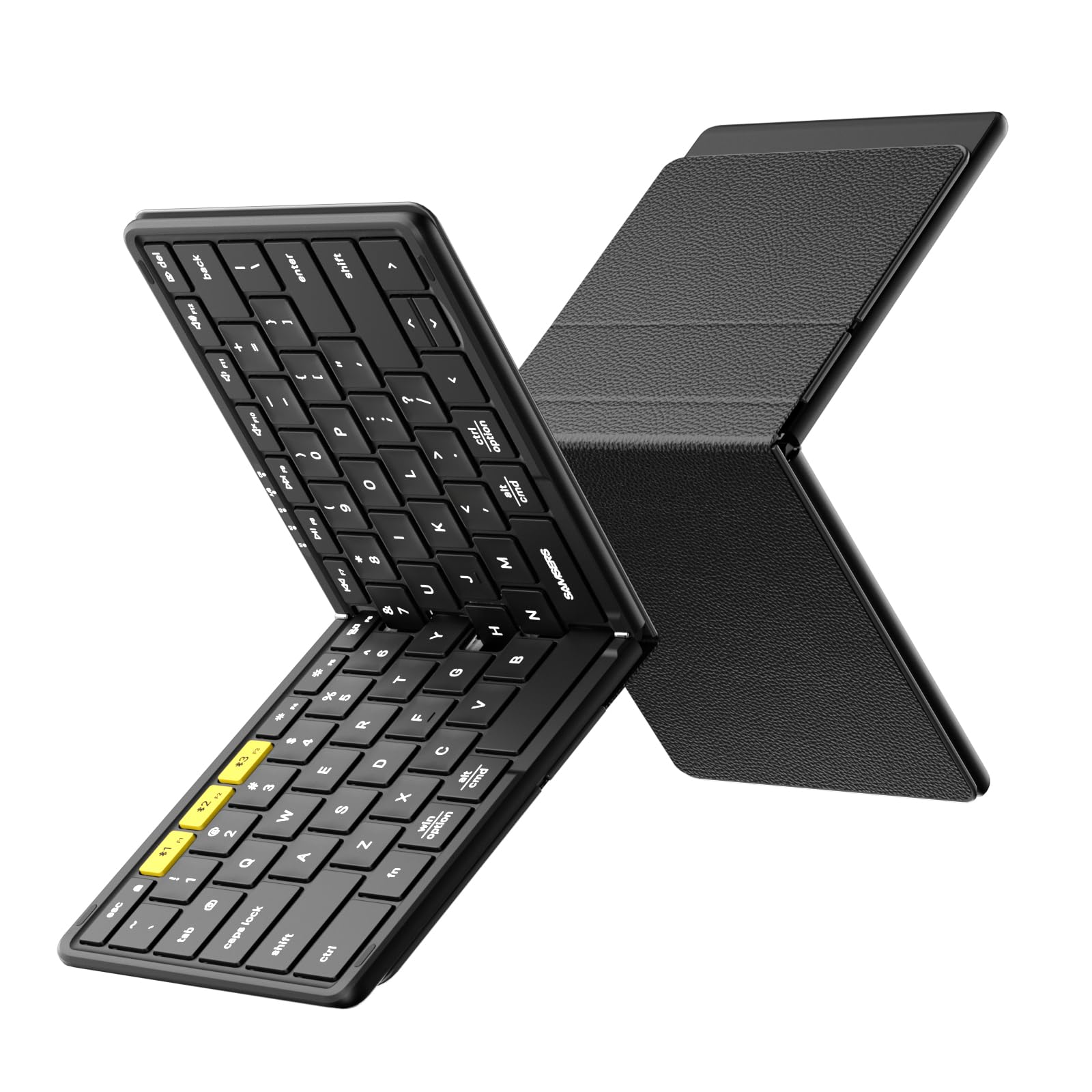
Samsers KF08S
Key Features
- Folding Type: Bi-fold
- Key Layout: Full-size, 6-row
- Connectivity: Bluetooth 5.0
- Battery: USB-C, 120-day standby
- Extras: PU leather cover
- Price: Budget
The Samsers KF08S delivers a full-size key layout with laptop-like spacing and metal hinges at a budget-friendly price — a clear departure from ultra-compact folding keyboards that sacrifice key spacing for pocketability. The bi-fold design and PU leather cover make it easy to slip into a bag, and Bluetooth 5.0 pairs with up to three devices without hassle.
This keyboard suits budget-conscious travelers who want a traditional typing experience without a numeric keypad and don’t mind a smaller reviewer base. Long-term reliability under sustained daily typing has yet to be established at scale, making it a sensible choice for occasional or moderate use rather than heavy daily typing.
The protective PU leather cover doubles as a stand, and the metal hinges give the keyboard a solid feel when unfolded — a step up from flimsier plastic alternatives at this price. Multi-device switching is responsive, though the lack of a numeric keypad is a tradeoff for compactness that some spreadsheet users will notice.
Pros
- Full-size key layout with spacing similar to a laptop keyboard.
- Portable design with a protective PU leather cover that doubles as a stand.
- Bluetooth 5.0 pairs quickly and switches between up to three devices.
- Metal hinges provide a solid feel when unfolded.
Cons
- No separate numeric keypad — number row only, a design compromise for compactness.
For budget-conscious travelers who prioritize full-size key spacing and don’t need a numeric keypad, the Samsers KF08S offers a practical balance of portability and typing comfort.
Best for Premium Typist
Logitech MX Keys Mini
Key Features
- Folding Type: Non-foldable
- Key Layout: Compact w/ illumination
- Connectivity: Bluetooth Low Energy
- Battery: USB-C, 10 days backlit
- Extras: Smart backlight
- Price: Premium
The concave key caps and scissor-switch mechanism deliver a responsive, stable typing feel that matches full-size desktop keyboards. Smart backlighting adjusts to ambient light levels, keeping keys visible without glare — a practical touch for low-light environments.
Battery life spans up to 10 days with backlighting on, or five months without, and recharges via USB-C. The compact footprint saves desk space while maintaining full-sized key spacing, making it a natural fit for shared workspaces or hotel desks.
This keyboard suits mobile professionals who work between desks and value key feel over foldability. Bluetooth connectivity can be inconsistent — some users experience random disconnects. The premium price reflects build quality and typing experience rather than portability features like folding hinges.
Pros
- Concave key caps provide a precise, tactile typing experience
- Smart backlighting adjusts automatically to room lighting
- Compact design frees up desk space without sacrificing key size
- Multi-device switching works across three paired devices
Cons
- Premium price for a non-foldable design
- Some units develop key or backlight failures over time
- Bluetooth connection may drop intermittently for some users
For typists who demand a premium typing feel and can accept occasional Bluetooth quirks, this compact keyboard delivers where foldable alternatives fall short.
Best for Ultra-Portable Typing
Samsers KT03
Key Features
- Folding Type: Bi-fold
- Key Layout: Compact 64-key
- Connectivity: Bluetooth
- Battery: USB-C, 48 hr use
- Extras: Touchpad
- Price: Budget
The Samsers KT03 folds into a pocketable rectangle with a touchpad embedded in the right half — no mouse or separate trackpad needed. Unlike full-size foldable alternatives, it shrinks the keyboard to a minimal footprint that slips into a jacket pocket or small bag.
This keyboard suits travelers who type in short bursts — responding to messages, jotting notes, or navigating a tablet. The touchpad handles basic cursor movement, though precise scrolling or drag operations feel less responsive than a dedicated mouse. Those with small hands will find the compact layout comfortable; larger fingers will struggle.
Bluetooth pairing is snappy across up to three devices, and the battery holds charge for days of intermittent use — a USB-C port tops it up quickly.
Pros
- Pocket-sized when folded — fits in a jacket pocket or small bag.
- Built-in touchpad eliminates the need for a separate mouse.
- Quick Bluetooth pairing with up to three remembered devices.
- Long standby battery life — lasts through multi-day trips without recharging.
Cons
- Key spacing is too narrow for touch typing — better suited for short messages and hunting-and-pecking.
- Some units may develop unresponsive keys or trackpad issues over time.
- Plastic casing feels light and can flex under pressure — best placed on a hard surface.
For travelers who prioritize pocketability over typing speed and don’t mind compromise on key feel, the KT03 delivers the smallest all-in-one typing solution with a touchpad.
Best for Pocket Keyboard
iClever BK08

Key Features
- Folding Type: Tri-fold
- Key Layout: Compact 65-key
- Connectivity: Bluetooth
- Battery: USB-C, 60 days use
- Extras: Touchpad, pouch
- Price: Mid-Range
The iClever BK08 packs a full Bluetooth keyboard and touchpad into a pocket-sized tri-fold shell. Its aluminum build feels sturdy, and the included phone stand and carrying pouch add travel convenience. Multi-device switching works for quick pairing across phone, tablet, and laptop. However, the compact layout makes touch typing cramped, and Bluetooth connectivity can drop during use. The trackpad is sluggish, so reaching for a separate mouse or tapping the screen may be faster. These tradeoffs are acceptable if your typing stays short and the keyboard isn’t your primary input device.
Pros
- Folds to a size that slips into a pocket or small bag
- Aluminum construction offers a durable, premium feel
- Includes a phone stand and carrying pouch for travel
Cons
- Bluetooth connection can be unstable with occasional disconnects
- Key spacing is too cramped for comfortable touch typing
Best suited for travelers who send short messages or jot notes and don’t rely on the touchpad for navigation — consider a full-size alternative if you type long documents or need precise cursor control.
Best for Phone Cradle
Logitech K585 Slim

Key Features
- Folding Type: Non-foldable
- Key Layout: Full-size w/ numpad
- Connectivity: Bluetooth + 2.4GHz
- Battery: 2x AAA, 24 mo claim
- Extras: Built-in cradle
- Price: Mid-Range
The Logitech K585 stands out from folding alternatives by including a built-in cradle that props your phone or tablet at a comfortable viewing angle — useful when you’re typing while watching a video or following a recipe. The full-size key layout and quiet, solid keys feel more like a desktop keyboard than a travel accessory. However, the cradle slot is narrow: devices with thick protective cases won’t fit, and you’ll need to remove them or use a slim case. Battery life with two AAA cells can fall short of the advertised 24 months with daily use, and some units experience occasional Bluetooth dropouts. This keyboard suits travelers who want a stable typing surface and prefer a dedicated cradle over a foldable design, provided their devices are cased thinly.
Pros
- Built-in cradle holds phone or tablet at a comfortable viewing angle.
- Solid build quality with quiet, comfortable full-size keys.
- Compact footprint for a non-foldable keyboard — easy to pack in a bag.
Cons
- Cradle slot may not fit phones or tablets with thick protective cases.
- Battery life with regular use can be shorter than the 24-month claim.
Works well if you prioritize a viewing cradle over foldability and use thin cases — but skip it if you need the smallest packable size or have a rugged phone case.
Best for Lap Usability
Ghajz DF006

Key Features
- Folding Type: Bi-fold w/ lock
- Key Layout: Full-size w/ numpad
- Connectivity: Bluetooth x2 + USB
- Battery: USB-C, 150-200 day standby
- Extras: Mouse, case, stand
- Price: Mid-Range
The DF006 delivers a full-size keyboard and mouse in a compact folding kit that stays rigid on uneven surfaces thanks to its locking hinge. Metal hinges feel sturdy, and the four connection options (Bluetooth x2, USB-A, USB-C) make device switching straightforward. The included hard case and stand add travel convenience, while the keys and mouse operate quietly enough for shared spaces.
Pros
- Locking hinge keeps the keyboard stable on laps, airplane trays, and other uneven surfaces.
- Full-size layout with numeric keypad fits a compact foldable form.
- Four connection options (Bluetooth x2, USB-A, USB-C) for switching between devices.
Cons
For travelers who need a stable typing surface without a desk, the DF006’s lock mechanism sets it apart – it’s a well-built option that suits that specific use case.
Best for Occasional Use
SIKAI CASE Mini

Key Features
- Folding Type: Horizontal fold
- Key Layout: Mini 60-key
- Connectivity: Bluetooth
- Battery: USB-C, 45 hr use
- Extras: Magnetic stand
- Price: Premium
The SIKAI CASE Mini folds down to jacket-pocket size with a solid aluminum build that feels more premium than its price suggests. Bluetooth pairing is quick, and the magnetic stand props up a phone or tablet for hands-free viewing. However, the keys are extremely small — too cramped for touch typing or anyone with larger hands — and the magnetic stand may not hold devices with thick cases securely. This keyboard suits minimalist travelers who need an occasional typing tool for short notes, not a daily driver.
Pros
- Extremely compact when folded – fits in a jacket pocket.
- Aluminum build feels premium.
- Fast Bluetooth pairing.
Cons
- Keys are very small, unsuitable for touch typing or large hands.
- Magnetic stand is weak and may not hold devices with cases.
Best for occasional use on the go when pocket space is at a premium, but not a practical choice for regular typing tasks.
How to Choose
The trade-off between portability and durability is the defining factor: a thinner, lighter keyboard often uses less robust hinges and membranes, so matching the folding type to your travel frequency is critical.
Folding Type
Tri-fold keyboards (folding into three panels) offer a full-size layout with a numeric keypad, but the extra hinge adds two potential failure points. Bi-fold models are simpler and lighter, yet they often shrink key spacing or omit the numpad. For daily travelers who need a true desktop replacement, tri-fold is worth the hinge risk; for occasional use, a bi-fold is more reliable.
Key Layout
Full-size keys with standard pitch (19mm) allow touch typing without errors, while compact layouts (under 16mm pitch) force finger gymnastics. Measure your current keyboard’s key pitch — if you regularly mistype on a cramped layout, invest in a full-size foldable even if it’s slightly bulkier. Compact keyboards are fine for quick replies but fatigue heavy typists within minutes.
Connectivity
Bluetooth-only keyboards save the need for a dongle but can suffer interference in crowded airports. Models with a 2.4GHz receiver offer more stable connections, though you lose a USB port. Some dual-connectivity keyboards let you switch between devices seamlessly — helpful if you use a laptop and phone simultaneously.
Battery
USB-C rechargeable batteries with 100+ day standby are common, but real-world use often halves that. Keyboards with replaceable AAA batteries (like the Logitech K585) never need downtime, while internal batteries last several years before needing replacement. If you travel for weeks without power, prioritize long standby or AAAs.
Extras
Backlighting, touchpads, and included stands add weight and cost. Backlighting on folding keyboards is rarely as bright as a laptop’s, and touchpads often lag behind dedicated mice. Only pay for these features if you specifically need to type in dark planes (backlight) or avoid carrying a mouse (touchpad). A bundled case or stand, however, almost always adds real convenience.
FAQ
Why do my foldable keyboard keys stop working after a few months?
The internal membrane and hinge flex from daily folding creates micro-fractures in the circuit traces over time. This is most common in budget tri-fold models where the key matrix passes through fold lines. Choosing a bi-fold design or one with reinforced hinge channels (like the Ghajz DF006) reduces this risk, though no foldable is immune.
Can I use a travel keyboard on an airplane tray table?
Most full-size foldable keyboards (like the ProtoArc XK01) are too wide for standard economy tray tables — the table’s depth is usually 10–12 inches, while a full keyboard is 11–13 inches deep. Compact bi-fold models or the Logitech MX Keys Mini fit much better, though they lack a numeric keypad. If tray table typing is frequent, go with a compact non-foldable or a mini foldable.
What is the most reliable full-size foldable keyboard for travel?
Based on user feedback over thousands of reviews, the ProtoArc XK01 has the best track record for a full-size foldable at a reasonable price, though some units still develop key failures. The Samsers KF08S shows promising early reliability with metal hinges, but lacks long-term data. For maximum peace of mind, consider a non-foldable premium keyboard like the Logitech MX Keys Mini if foldability isn’t essential.
How long do rechargeable travel keyboards last between charges?
Most claim 100–150 days of standby, but real-world use (typing 2–4 hours daily) typically delivers 3–6 weeks before needing a recharge. Backlit models drain faster — expect 10–14 days with the backlight on medium. USB-C charging makes top-ups quick, so even a 10-minute charge often yields days of use.