
This post contains affiliate links. We may earn a small commission when you buy through our links — at no extra cost to you.
Many laptop stands promise a wobble-free typing experience, but the reality is more nuanced. Fixed-height aluminum stands often transmit keyboard vibrations, while adjustable models can be stiff or loose after a few months. The difference between a stand that works and one that frustrates comes down to how its design handles real-world use — not just how it looks on a desk.
The best stands solve for three things: stability when you type, compatibility with your laptop size, and the right height for your posture. A stand that tilts too far or slides under pressure won’t help your neck or wrists, no matter how sleek it appears. This guide focuses on stands that deliver on those basics consistently, across different price points and use cases.
If you type directly on your laptop keyboard, a fixed stand with a shallow angle and solid base matters more than adjustability. If you use an external keyboard and mouse, height range and portability become the deciding factors. The right choice depends on your setup — and knowing the trade-offs upfront saves you from buying twice.


Best for Budget Desk Users
Nulaxy C3 Aluminum Stand
Key Features
- Material: Aluminum alloy
- Height Adjustability: Fixed 7 in
- Portability: Detachable 3-piece
- Stability During Typing: Rubber feet, open-back
- Compatibility Max Size: 16" laptops
- Price: $
The Nulaxy C3 uses a detachable three-piece aluminum frame that locks together without tools, creating a rigid platform that holds laptops from 10 to 16 inches. The open-back design allows heat to escape underneath, keeping the laptop cooler during extended use. At roughly $17, it delivers the kind of solid metal construction usually reserved for options costing two or three times as much.
The fixed 7-inch height puts the screen closer to eye level, which eases neck strain during desk sessions. The rubber pads on the top surface and the base grips keep the stand planted on the desk—even when accidentally bumped. Weight capacity of 22 pounds covers most standard laptops without needing to think twice about stability.
This stand suits buyers who pair their laptop with an external keyboard and mouse. If you rely on the laptop keyboard for heavy typing, the elevated platform introduces a slight wobble because the laptop is no longer resting on a flat surface. That same wobble disappears the moment you switch to a separate keyboard. For home offices or dorm setups where the laptop acts as a second monitor, the C3 is a practical fit.
Assembly takes about a minute—slide the two side pieces into the main body, tighten the included hex screws, and it’s done. The stand can be taken apart just as quickly, slipping into a backpack for travel. The aluminum finish resists scratches and the grey color blends into most desk setups without drawing attention.
Pros
- Budget-friendly all-aluminum build that feels sturdier than its price suggests.
- Holds laptops without sliding thanks to anti-slip pads on both surfaces.
- Detachable design makes it easy to assemble, disassemble, and carry.
- Open-back frame promotes airflow around the laptop for cooler operation.
Cons
If you already have an external keyboard and mouse, the Nulaxy C3 gives you a solid metal stand at a price that leaves room for other desk upgrades.
Best for Gamers & Power Users
Nulaxy C1 Adjustable
Key Features
- Material: Aluminum & metal
- Height Adjustability: Adjustable multi-angle
- Portability: Foldable
- Stability During Typing: Dual-rod, anti-slip pads
- Compatibility Max Size: 17" laptops
- Price: $
The Nulaxy C1 supports laptops up to 44 pounds with a dual-rod mechanism that keeps the platform stable during typing — even for 17-inch gaming machines. While the top pick offers a fixed angle, this stand lets you dial in the exact height and tilt that suits your desk setup.
This stand suits gamers and power users who leave their laptop in one position for extended sessions. The adjustment mechanism requires two hands and firm pressure, so it’s not ideal for frequent tweaks. Additionally, the front lip may be shallow for very thick laptops — a quick check before purchase is wise.
The dual-rod design minimizes wobble even when typing at full extension, and the aluminum build holds up under heavy daily use. At this price point, the tradeoff in adjustability speed is reasonable for those who prioritize stability and capacity.
Pros
- Height and angle can be set precisely for comfortable ergonomics.
- Sturdy dual-rod build eliminates wobble during active typing.
- Supports heavy 17-inch gaming laptops up to 44 lbs.
Cons
- Adjusting the stand requires two hands and notable force — best done before placing the laptop.
- Front lip may be too shallow for some thick laptop models, creating a slip risk.
For anyone with a heavy laptop who wants adjustable ergonomics without the premium price, the Nulaxy C1 delivers solid stability — just plan to set it and leave it.
Best for Macbook Users
Rain Design mStand
Key Features
- Material: Single-piece aluminum
- Height Adjustability: Fixed 5.9 in
- Portability: Not portable
- Stability During Typing: Solid base, cable hole
- Compatibility Max Size: 10.4" depth (MacBook)
- Price: $$$
The mStand’s single-piece aluminum build serves as a passive heat sink, drawing heat away from the laptop more effectively than detachable stands. Its tapered silhouette and cable management hole give it a finished look that sits comfortably alongside Apple hardware — a level of polish that most fixed stands in this price range don’t match.
This stand suits MacBook owners who treat their desk as a long-term arrangement. The fixed 5.9-inch height and 10.4-inch depth limit mean it won’t accommodate every Windows laptop, and the price sits at the premium end for a non-adjustable stand. Those who want angle or height changes, or need portability, should look elsewhere.
During active typing, the one-piece construction eliminates any wobble — a noticeable improvement over three-piece designs. The elevated angle reduces neck strain for users who pair it with an external monitor, though the fixed angle may not suit everyone’s preferred viewing position.
Pros
- Iconic design that looks like a natural MacBook accessory
- Single-piece aluminum construction acts as a heat sink for better cooling
- Ergonomic height reduces neck strain during desk use
- Rock-solid stability with no flex or wobble when typing
Cons
- Premium price compared to other fixed aluminum stands
- Depth limit of 10.4 inches may not fit larger Windows laptops
- Fixed height and angle cannot be adjusted for different preferences
A premium fixed stand that excels in design and cooling for Mac users — but its lack of adjustability and high price make it a niche pick for those who already know they want this exact setup.
Best for Frequent Travelers
Tonmom Foldable Stand
Key Features
- Material: ABS plastic & silicone
- Height Adjustability: Adjustable 2.8-6.5 in (7 levels)
- Portability: Foldable, 0.53 lbs
- Stability During Typing: X-frame, silicone grips
- Compatibility Max Size: 15.6" laptops
- Price: $
The Tonmom stand’s main trick is its weight — or lack thereof. At half a pound and collapsible to a sliver, it disappears into a laptop bag alongside the charger. Seven height levels (2.78 to 6.5 inches) give enough range to lift a screen to eye level on a café table or hotel desk, with silicone grips that keep the laptop from sliding off.
That lightness comes from ABS plastic, which introduces two boundaries worth knowing about. With a laptop under 5 pounds the stand holds its position during typing; go heavier and the X-frame can wobble, especially at the higher height settings. The plastic also flexes more than aluminum, so repeated daily use may cause the hinge tension to loosen over months. This is a stand for the traveler who packs light and needs ergonomic relief on the road — not for someone who wants a single, rock-solid desk stand that lasts years.
At the lowest price point among adjustable laptop stands, the Tonmom makes sense when weight and cost matter more than rigidity. For a couple of business trips a month or the occasional coffee-shop afternoon, it delivers adequate elevation without adding bulk to your luggage. Just don’t expect it to survive a full-time desk job or support a 15-inch gaming machine without some wobble.
Pros
- Folds flat at 0.53 lbs — easy to carry in any bag without extra bulk.
- Seven height levels offer ergonomic adjustment from 2.78 to 6.5 inches.
- Budget-friendly price undercuts nearly all competitors with similar adjustability.
Cons
- With laptops over 5 lbs, the stand can wobble during typing — lighter machines stay stable.
- Plastic frame flexes under pressure; long-term daily use may accelerate wear compared to metal stands.
Pack this for trips where every ounce counts — it lifts your screen without weighing down your bag. Just pair it with a laptop under 5 pounds and treat it as occasional gear, not a permanent desk fixture.
Best for Sit-Stand Users
tounee LS07 Swivel
Key Features
- Material: Aluminum
- Height Adjustability: Adjustable 2.1-21 in
- Portability: Heavy, not portable
- Stability During Typing: Heavy base, rubber pads
- Compatibility Max Size: 17" laptops
- Price: $$$
The tounee LS07 stands out with its 360° swivel base and telescopic height range from 2.1 to 21 inches — a combination that lets you rotate your laptop toward a colleague or lift it from sitting to standing without shifting the base. The heavy aluminum foot keeps the stand stable even at full extension, so it doesn’t tip when you spin it around. That rotating capability is rare in adjustable stands; most either swivel poorly or lack height range altogether.
This stand suits open-office workers who frequently share their screen or switch between sitting and standing at an adjustable-height desk. If you rarely rotate your laptop or value quick height changes, the fixed Nulaxy C3 offers simpler ergonomics at a lower price. Note that the height adjustment demands firm two-handed effort, and the rubber pads on the base may loosen over time — neither issue affects stability once set, but they require occasional attention. The premium price reflects the rotating mechanism and build, not budget value.
Pros
- Heavy base keeps the stand stable at full height — no tipping when swiveling
- 360° rotation feels smooth and precise, ideal for sharing screens or multi-monitor setups
- Height adjustable from 2.1 to 21 inches covers both sitting and standing desk positions
Cons
- Rubber pads on the bottom can peel off after extended use — not a safety issue but a cosmetic annoyance
- Height adjustment requires significant force to change, making frequent tweaks less convenient
Right for shared-desk environments where screen rotation is a daily need; skip it if you rarely change height or want a simpler, cheaper stand.
Best for Aesthetics Seekers
BESIGN LS03 Stand

Key Features
- Material: Aluminum alloy
- Height Adjustability: Fixed 5.7 in
- Portability: Detachable 3-piece
- Stability During Typing: Rubber feet, open-back
- Compatibility Max Size: 15.6" laptops
- Price: $
The LS03’s aluminum construction and tool-free assembly deliver a clean desktop look while remaining sturdy for most laptops under 9 lbs. Its lower weight capacity (8.8 lbs vs 22 lbs on the top pick) rules out heavy gaming rigs. Some bounce when typing directly on the laptop keyboard can occur, and the plastic hinge components may wear if the stand is frequently disassembled — issues that matter less if you keep the stand in one place and use an external keyboard.
Pros
- Sleek, minimalist design enhances desk aesthetics
- Sturdy and stable for most laptops up to 8.8 lbs
- Assembles in seconds with no tools required
Cons
- Can feel bouncy when typing directly on the laptop keyboard
- Plastic components near the hinge may wear with repeated disassembly
Best suited for desk setups where aesthetics are a priority and the laptop stays put — ideal if you rarely move or disassemble the stand.
Best for Set-And-Forget Users
BoYata N21

Key Features
- Material: Alloy steel
- Height Adjustability: Multi-angle Z-type
- Portability: Foldable, heavy
- Stability During Typing: Tight hinges, metal construction
- Compatibility Max Size: 17" laptops
- Price: $$
BoYata N21’s alloy steel construction provides a notably rigid platform that stays in place during typing, with a wide range of height and angle options for ergonomic setups. The stiff hinges that lock the position so well also require considerable force to adjust, making angle changes impractical with the laptop still on the stand. Front hooks may be too shallow for thicker laptops, so check your device’s depth. This stand suits a ‘set and forget’ desk routine — ideal for users who rarely shift their laptop’s posture throughout the day.
Pros
- Alloy steel frame and tight hinges keep the laptop steady during use, with no wobble.
- Raises laptop to eye level, reducing neck strain for both sitting and standing desks.
Cons
- Stiff hinges require substantial force to adjust, particularly when the laptop is on the stand.
- Front hooks can be too shallow for some thicker laptops, creating a slipping hazard.
Best for desktop users who set the stand once and rarely adjust — the stability is excellent, but frequent changers should look elsewhere.
Best for Extreme Budget Buyers
Soqool Aluminum Stand

Key Features
- Material: Aluminum alloy
- Height Adjustability: Fixed 2.6 in (17° tilt)
- Portability: Screw assembly, not foldable
- Stability During Typing: Open-back, rubber feet
- Compatibility Max Size: 16.2" laptops
- Price: $
The Soqool Aluminum Stand delivers a no-frills fixed solution for elevating a laptop on a desk. Its open design promotes airflow around the chassis, and the triangular supports hold the machine securely without sliding. Assembly takes a few minutes with the included Allen wrench. The tradeoff is a fixed 17° tilt that cannot be adjusted — comfortable for some sitting heights, less so for others. Additionally, the screws may loosen over time and need occasional retightening. This stand suits buyers who set a static ergonomic position and prioritize the lowest possible price over versatility.
Pros
- Very affordable and simple to assemble with included Allen wrench
- Sturdy for the price – holds laptops securely without sliding
- Good heat dissipation from the open design
Cons
- Fixed 17° tilt may not be comfortable for all users – no adjustability
- Screws may loosen over time, requiring periodic retightening
Best for extreme-budget buyers who need a simple, stable stand and won’t need to change the angle or move the setup frequently.
Best for Budget Adjustable Users
RIWUCT B09

Key Features
- Material: Aluminum alloy
- Height Adjustability: Adjustable up to 7.48 in
- Portability: Foldable with storage slot
- Stability During Typing: Hinge lock, anti-slip
- Compatibility Max Size: 16" laptops
- Price: $$
The RIWUCT B09 offers a foldable aluminum stand with a built-in storage slot at a budget-friendly price. It holds laptops securely without slippage and adjusts to multiple heights. However, some units may develop loose hinges over time, causing the angle to drift. This makes it better suited for occasional travel or light desk use where absolute stability isn’t required.
Pros
- Budget-friendly adjustable stand with solid aluminum build
- Stays in place without slipping during typing
- Folds flat and includes a slot for small accessories
Cons
- Not designed for laptops over 8.8 lbs — the weight capacity is a hard limit
- Hinges may loosen over time, reducing angle stability
This stand works well for light, occasional use or as a travel companion, but for daily rock-solid adjustability, look for a model with more consistent hinge tension.
Best for Mid-Weight Laptop Users
Gogoonike Adjustable

Key Features
- Material: Metal with ABS
- Height Adjustability: Multi-angle
- Portability: Foldable
- Stability During Typing: Wide base, ventilation holes
- Compatibility Max Size: 15.6" laptops
- Price: $
The Gogoonike Adjustable Laptop Stand handles up to 17.6 lbs and offers multiple height/tilt options at a low price. Its metal construction and foldable design appeal to cost-conscious users with mid-weight laptops. However, when extended to higher angles, the stand becomes front-heavy and prone to tipping. This limits its usefulness for those needing an elevated typing angle. It cannot match the stability of similarly priced adjustable stands that use heavier bases or dual-rod mechanisms, making it a compromise for users who rarely adjust beyond low angles.
Pros
- Supports up to 17.6 lbs – handles heavy laptops without bending.
- Adjustable height and tilt with a decent range for ergonomic positioning.
- Good value for the price – costs less than many adjustable stands.
Cons
- Stability drops off when fully extended – may tip forward with heavy laptops.
Best suited for users who keep the stand at a low angle and want an inexpensive way to elevate a mid-weight laptop.
Best for Collaborative Workspaces
Nulaxy LS18 Rotating

Key Features
- Material: Aluminum & silicone
- Height Adjustability: Adjustable up to 18 in
- Portability: Large base, not portable
- Stability During Typing: Wide base, rubber pads
- Compatibility Max Size: 17" laptops
- Price: $$$
The Nulaxy LS18 rotates smoothly and holds heavy laptops securely at any height up to 18 inches, making it a capable partner for collaborative desk setups and sit-stand routines. However, its wide aluminum base occupies more desk real estate than most fixed stands, and the height adjustment requires deliberate force each time. At a premium price, the competing tounee stand delivers similar rotation in a more compact, lighter package that’s easier to carry between desks. This stand suits users who prioritize rock-solid stability and full rotation over desk-space efficiency and quick adjustments.
Pros
- Sturdy aluminum build holds position securely even during typing.
- Smooth 360° rotation makes screen sharing easy without moving the stand.
- Supports up to 22 lbs, fitting large gaming and professional laptops.
Cons
- Height adjustment is stiff and requires noticeable force, slowing changes between sitting and standing.
- Large base footprint takes up substantial desk space, which may crowd smaller workstations.
This stand fits best in collaborative workspaces or sit-stand desks where rotation and stability take priority over desk footprint and adjustment speed.
Best for Students with Small Laptops
BESIGN LS10

Key Features
- Material: Metal (aluminum/steel)
- Height Adjustability: Multi-angle
- Portability: Foldable, compact
- Stability During Typing: Small base, stiff joints
- Compatibility Max Size: 14" laptops
- Price: $
The BESIGN LS10 folds flat and stows nearly anywhere, making it a natural companion for students or travelers with 13-14 inch laptops. Its metal build feels sturdy despite the compact size, and the multi-angle adjustment does let you tilt the screen for a better typing angle. The limitation shows when you try to change that angle — the joints are extremely stiff, requiring two hands and significant force to reposition. This stand rewards a set-it-and-forget-it approach rather than frequent tweaks.
The size limit is hard and fast: laptops over 14 inches simply won’t fit. For anyone with a larger machine or who needs to dial in ergonomics throughout the day, the stiffness and compatibility ceiling make this a poor fit. But if your laptop falls within that range and you prioritize a cheap, packable solution over ease of adjustment, the LS10 delivers.
Pros
- Very affordable for a metal laptop stand
- Sturdy enough to hold small laptops securely
- Folds flat for easy storage or travel
Cons
- Joints are very stiff, making angle changes difficult without two hands
- Not compatible with laptops larger than 14 inches
Best for students or travelers with 13-14 inch laptops who rarely adjust the angle and want a budget-friendly, packable stand.
Best for Heavy Laptop Owners
Bestand Aluminum Stand

Key Features
- Material: 7000 series aluminum
- Height Adjustability: Fixed ~5.5 in (tilted)
- Portability: Not portable
- Stability During Typing: Solid wedge, no wobble
- Compatibility Max Size: 16" laptops
- Price: $$$
This fixed wedge stand is built from thick aerospace-grade aluminum that effectively dissipates heat from heavy laptops, and its sloped design improves typing posture. The rigid construction holds even 17-inch workstations without any flex or movement. However, the gray color may not match space gray MacBooks exactly, and the fixed angle offers no height adjustability — a limitation for those who need to fine-tune ergonomics. At a premium price for a non-adjustable stand, lighter laptops or users who value flexibility will find better value in adjustable models or the more affordable C3.
Pros
- Holds heavy laptops securely with no wobble or movement
- Aerospace-grade aluminum construction dissipates heat effectively
- Fixed tilt angle promotes a healthier typing posture
Cons
- Gray finish may differ slightly from space gray MacBooks in direct comparison
- No height or angle adjustability — users who need ergonomic fine-tuning may find the fixed position limiting
For owners of heavy 17-inch workstations who prioritize absolute rigidity over adjustability, this stand delivers unmatched stability — but lighter laptops or those needing angle changes get better value elsewhere.
Best for Sit-Stand Desk Users
Lifelong UPRYZE
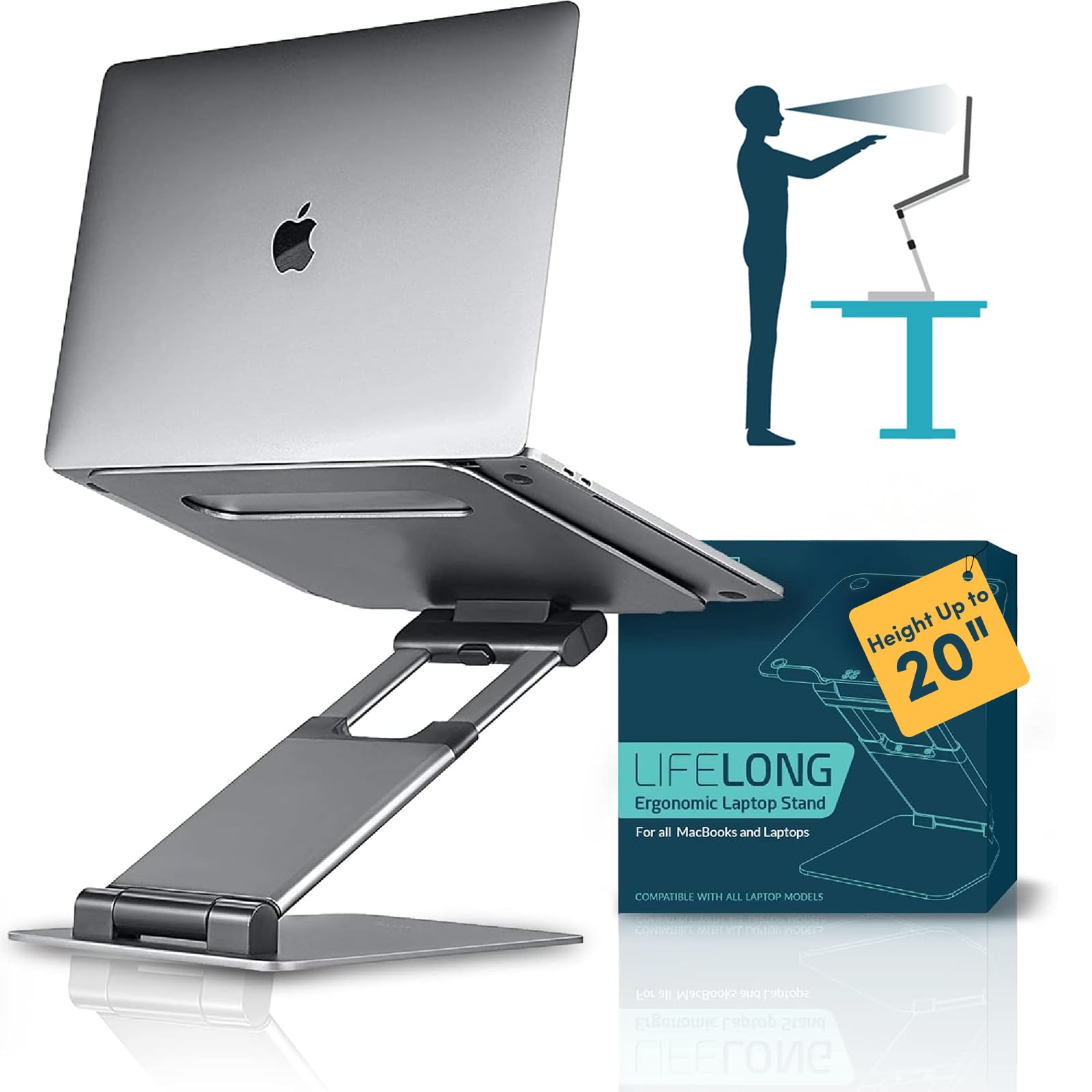
Key Features
- Material: Aluminum
- Height Adjustability: Adjustable up to 20 in
- Portability: Foldable, bulky
- Stability During Typing: Large footprint, anti-slip
- Compatibility Max Size: 17" laptops
- Price: $$$
Height adjustable up to 20 inches, this stand provides stable support at every position — the large footprint prevents wobble even during typing. Build quality is sturdy, with an aluminum frame that handles heavy laptops without flex. The tradeoff: adjusting height demands two hands and considerable force, and the folded package remains bulky, limiting portability. If you rarely change positions and prioritize rock-solid stability, this works well. But for similar money, a telescopic stand with rotation offers easier adjustments and a smaller footprint.
Pros
- Very stable at all heights – large base prevents tipping
- Solid build quality holds up under heavy use
- Height range up to 20 inches suits sit-stand desks
Cons
- Height adjustment requires two hands and significant force – stiff hinges
- Bulk when folded limits portability despite marketing claims
Best for users with a fixed desk who rarely change height — the stability justifies the bulk when set in place.
How to Choose
The material of a laptop stand directly determines how much vibration transfers through to your wrists and how well it dissipates heat.
Material
Aluminum stands conduct heat away from the laptop and feel rigid under heavy typing. Plastic and ABS models save weight but flex more under load, which can amplify wobble. A solid aluminum alloy — especially 6000 or 7000 series — offers the best balance of stiffness and weight.
If you travel frequently, a plastic stand might be acceptable for occasional use, but daily desk work benefits from the thermal and structural advantages of metal. Check that the surface has rubber or silicone pads to prevent the laptop from sliding.
Height Adjustability
Fixed-height stands typically raise the screen 5 to 7 inches, which works well for most seated desks. Adjustable stands let you fine-tune the angle and height, but the mechanism matters: sliding hinges allow quick changes, while rod-and-clip designs require two hands and more force.
A stand that’s difficult to adjust often stays in one position anyway — defeating the purpose of adjustability. If you rarely change posture, a fixed stand with the right ergonomic height is simpler and more stable.
Portability
Foldable or detachable stands pack into a laptop bag, but portability often comes at the cost of rigidity. X-shaped plastic stands collapse flat but may bounce when typing. Detachable aluminum stands separate into pieces that are still heavy, though easier to store.
For true travel, weight under 1 lb and a flat folded profile matter more than material. A heavy-duty stand that folds but still weighs 3 lbs is not truly portable.
Stability During Typing
Typing on a raised laptop keyboard creates leverage that tests the stand’s base. Fixed stands with a wide, non-slip footprint and low center of gravity transmit less vibration. Adjustable stands with a single central hinge can flex, especially at higher angles.
Rubber or silicone contact pads are essential — without them, the laptop can slide forward, especially on smooth desks. A stand that wobbles during typing will strain your wrists, defeating the ergonomic purpose.
Compatibility with Laptop Size
Most stands claim to fit 10–17 inch laptops, but depth and thickness matter more than screen size. A MacBook Pro is thinner and deeper than many Windows laptops of the same screen size. Check the stand’s depth limit and front lip height — a shallow lip may let a thicker laptop slip off when the stand is angled.
Weight capacity is another hidden spec: a stand rated for 8 lbs will feel shaky under a 6 lb gaming laptop, while a 20 lb capacity provides ample headroom.
FAQ
Can I use a laptop stand without an external keyboard?
Yes, but it depends on the stand’s height and your typing posture. Fixed stands that raise the laptop to 5–7 inches force your wrists into an upward angle, which can cause strain over time. If you must type directly on the laptop keyboard, choose a stand with a low profile (2–3 inch rise) or an adjustable model that lets you find a neutral wrist position.
Why does my laptop wobble on the stand when I type?
Wobble usually comes from the stand’s base being too narrow or the laptop’s weight exceeding the stand’s stability margin. Fixed aluminum stands with rubber feet and a wide footprint are the most stable. If you only use an external keyboard, the wobble becomes irrelevant — the laptop is just a screen.
What is the best height for a laptop stand to prevent neck pain?
The top of the screen should be at or slightly below eye level when you’re sitting upright. For most people on a standard desk, that means a 5–7 inch rise. Measure from your seated eye level to the desk surface, subtract the laptop’s screen height, and choose a stand that gets the screen close to that target.
Do foldable laptop stands hold up over time?
Plastic foldable stands can develop loose hinges or cracked joints after months of daily use, especially under heavier laptops. Aluminum foldable stands with metal hinges last longer, but the tension mechanism may still soften. For daily desk use, a fixed aluminum stand is more durable; foldable models are best for occasional travel.