
This post contains affiliate links. We may earn a small commission when you buy through our links — at no extra cost to you.
You search for a portable laptop stand, click for its compact fold, and read the ergonomic claims. Then you unbox it, start typing, and feel the wobble. That moment of instability under your fingers turns a clever tool into a frustration that undermines everything it promised.
This guide focuses on the real differentiator: how each stand behaves under active use. Whether you need a travel companion light enough for a backpack or a desk partner that stays planted during a long session, the right choice depends on balancing height range, build material, and stiffness against portability.




Best for Desk Stability
Lamicall Adjustable Aluminum
Key Features
- Build Material: Aluminum alloy
- Folded Size: 12 x 10 x 2 inches
- Height Range: Up to 8"
- Price: Mid-Range
The Lamicall stand delivers rock-solid support for laptops up to 17.3 inches, with a wide height and angle range that stays firmly in place once set. The all-aluminum construction feels substantial, and the adjustable joints hold position without drifting, even during intense typing sessions.
On very smooth desk surfaces, the rubber foot pads may slide if they accumulate dust or oil — cleaning them restores grip. Otherwise, the stand remains planted. The folded size is manageable for occasional room-to-room moves but not for daily bag carry; at about 0.6 kg, it is heavier than travel-oriented designs.
This stand is best suited for desk workers who prioritize stability above all else and rarely carry their setup. It matches the aesthetic of MacBooks and other aluminum laptops, and the firm joints mean you will set the height once and leave it. Frequent travelers or those who adjust posture multiple times a day would be better served by a lighter, quick-change model like the Roost V3 — the Lamicall is heavier and its hinges require deliberate adjustment.
While there are cheaper aluminum stands, none match the Lamicall’s near-total absence of wobble complaints — the extra cost buys confidence that your laptop won’t teeter during a deadline. The build quality alone justifies the price for anyone who values a stable typing surface.
Pros
- Exceptional stability keeps your laptop steady during active typing
- Sleek aluminum design complements MacBooks and other silver laptops
- Smooth height and angle adjustability with joints that stay put after setting
- Fits laptops from 10 to 17.3 inches, including large 16-inch models
Cons
- On smooth desks, the rubber pads can slide during active typing if not cleaned regularly — a quick wipe restores grip
- For daily bag carry, the stand’s weight (~0.6 kg) and folded size (12x10x2") make it less suitable than ultra-compact alternatives
For desk-bound workers who want a rock-solid stand that stays put, the Lamicall is the clear winner.
Best for Travel Ultralight
Roost V3 Portable
Key Features
- Build Material: Engineered Composite
- Folded Size: 1.2 x 13 x 1.3 inches
- Height Range: 6.5" to 12.5"
- Price: Premium
Weighing just 5.8 ounces and collapsing into a stick shape the size of a rolled-up magazine, the Roost V3 is the lightest laptop stand you can buy. Despite its minimal weight, the engineered composite frame locks rigidly with zero flex once set — a rare combination of portability and stability.
Setup takes under a second: pull the legs into one of five preset positions and the stand locks automatically. The memorized height setting means you can always return to your preferred angle without fiddling — a convenience that compensates for the lack of stepless adjustment.
This stand suits frequent flyers and digital nomads who need to minimize bag weight and set up a workspace in seconds. The tradeoffs are that height adjustment is limited to five discrete positions between 6.5 and 12.5 inches — not continuously adjustable — and the premium $90 price puts it out of reach for budget-conscious shoppers. If you need a specific height between those steps or plan to use it for standing desk setups, consider a full-range stand instead.
Pros
- Weighs only 5.8 ounces and folds to a compact stick — the easiest stand to pack for travel.
- Zero flex once locked; holds even large 18-inch laptops steady during typing.
- One-second setup with a memorized height setting — no re-adjusting each time.
Cons
- Premium $90 price is significantly higher than comparable aluminum stands.
- Only five discrete height settings — not stepless — which may leave some users between positions.
For travelers who need the lightest possible standalone stand and can work within its height range, the Roost V3 is unmatched. It is not a budget pick nor a solution for continuous adjustment, but for its specific use case — ultralight daily carry — it remains the benchmark.
Best for Sit-Stand
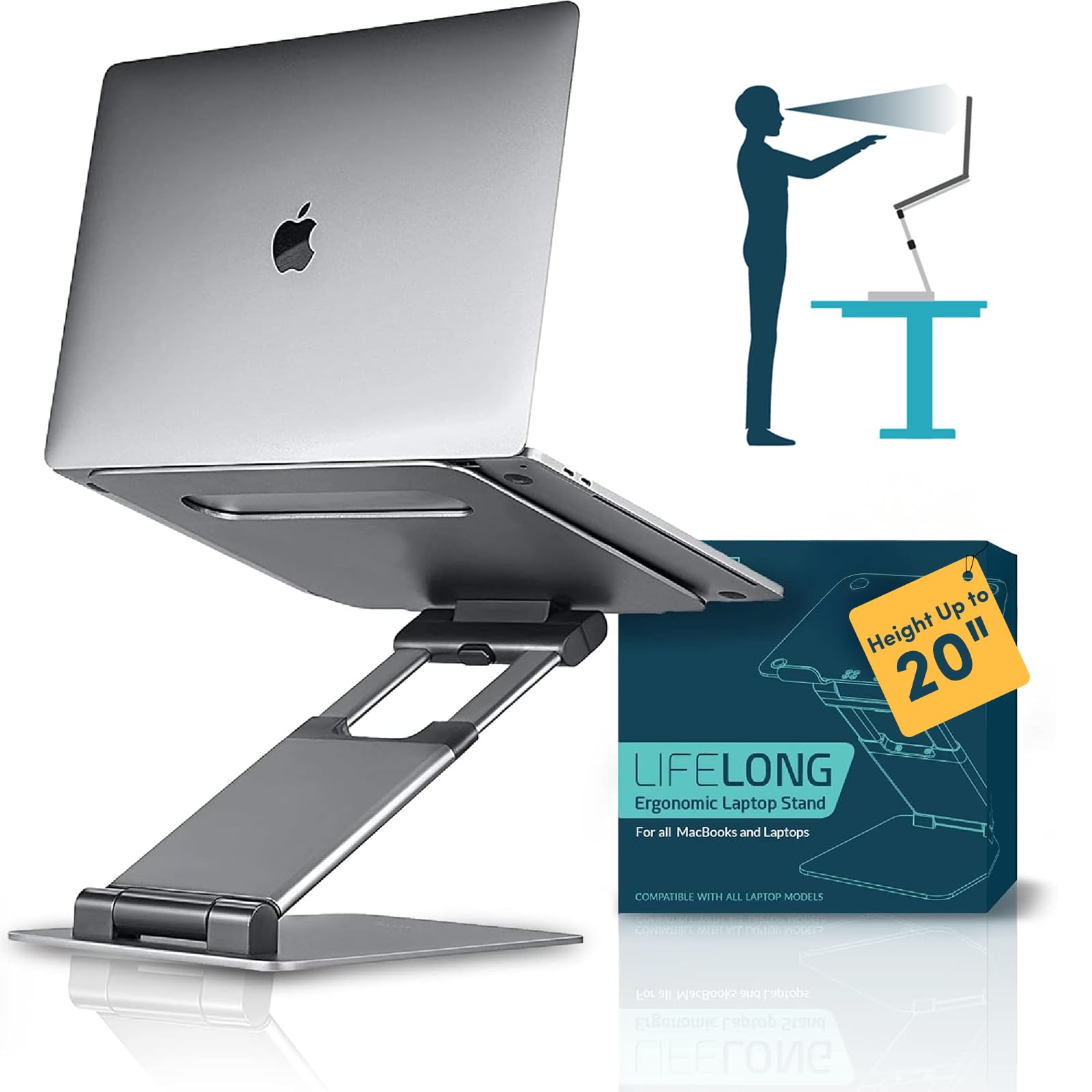
Lifelong UPRYZE 20"
Key Features
- Build Material: Aluminum
- Height Range: Up to 20"
- Price: Premium
A 20-inch height range lets this stand double as a mini standing desk, and the build quality keeps it stable even at maximum extension. Multiple hinges allow you to dial in both height and reach, so positioning feels precise rather than guesswork.
At full extension, a slight sway can occur during aggressive typing — a minor tradeoff given the extreme height. The aluminum frame and broad base keep the laptop firmly planted most of the time, making it suitable for dedicated desk work rather than coffee-shop sessions.
This stand suits home office workers who want standing-desk ergonomics without buying a new piece of furniture. But at over two pounds and a large folded footprint, it stays put on your desk — not in your backpack. Best for a single workstation where it can live permanently.
Pros
- Stays sturdy and stable even at the full 20-inch height
- Multiple hinges allow fine-tuning of both height and reach
- Ergonomic design reduces neck and back strain when switching between sitting and standing
Cons
- Heavy and bulky – not suitable for daily bag carry or travel
- At maximum height, a slight wobble may appear during heavy typing
- Large footprint demands ample desk space – won’t fit on cramped surfaces
For home office users who prioritize height and stability over portability, the Lifelong stand delivers a unique capability. Keep it on your desk — it’s not a travel companion.
Best for Budget Metal
RIWUCT Foldable Aluminum
Key Features
- Build Material: Aluminum alloy
- Folded Size: 9 x 9.2 x 1 inches
- Height Range: Up to 7.48"
- Price: Budget
The RIWUCT Foldable Aluminum stand offers an all-metal build at a price that undercuts most competitors — a noticeable step up in rigidity from the cheapest plastic or ultra-light metal stands. Its two-hinge design allows one-handed height and angle adjustments across a 7.5-inch range, and the non-slip pads keep most laptops from shifting during normal use. The aluminum frame folds flat to about one inch thick, making it easy to slide into a backpack for trips between home and office.
This stand suits students or remote workers on a tight budget who need an adjustable ergonomic lift for 10–16 inch laptops — especially those who use an external keyboard and mouse. At maximum extension, some wobble becomes noticeable during faster typing, so it’s less ideal for aggressive touch-typing on the laptop’s built-in keyboard. A small number of owners have also noted the bottom rubber pads can peel off after several months; keeping the stand on a smooth desk surface extends their grip. For its price, these tradeoffs are manageable for non-critical typing sessions.
Pros
- All-aluminum construction at a price that beats most metal stands in its class
- Folds flat to roughly one inch for easy backpack storage
- Height and tilt adjust smoothly with one hand while the laptop stays in place
Cons
- Wobble during typing at the highest extension can be distracting for fast typists
- Bottom rubber pads may detach after several months of use on certain surfaces
For anyone who needs a lightweight, adjustable laptop stand on a tight budget and can tolerate a little bounce at full height, the RIWUCT offers genuine value without the premium price tag.
Best for Compact Commute
SODI Ultra Compact
Key Features
- Build Material: Aluminum alloy + silicone
- Folded Size: 5 x 1.73 x 0.83 inches
- Height Range: 6 levels, max ~6.5"
- Price: Budget
The SODI Ultra Compact squeezes into a bag easier than any other stand at this price — the folded size is roughly the thickness of a smartphone. Its spring-loaded arm pops the stand open with one hand, letting you set up on a cafe table without fumbling. Compared to the thinnest competitors, it saves noticeable space when packed.
This stand suits commuters and coffee shop workers who need a quick ergonomic lift on small desks. The max height of roughly 6.5 inches is enough to angle a laptop for comfortable typing on a tabletop, but it won’t work for standing desk use — that tradeoff is what makes the footprint so small.
The aluminum frame and silicone pads keep most 10–16 inch laptops stable during typing. There’s minimal wobble even on uneven surfaces, and the six preset height levels cover the typical range for seated use.
Pros
- Smallest folded size of any stand at this weight class
- Spring-loaded arm enables one-handed setup and height changes
- Stable aluminum build resists wobble during active typing
- Weighs only 185 grams, negligible in any bag
Cons
- Spring mechanism may lose tension over months of daily use
- Maximum load capacity is not specified, so heavy or oversized laptops may not be fully supported
If your priority is a stand that disappears in a bag and sets up in seconds, the SODI delivers at a budget-friendly price — just keep seated desks in mind.
Best for Collaborative
OMOTON LA10 360° Rotating
Key Features
- Build Material: Aluminum alloy
- Folded Size: 11.4 x 1.7 inches
- Height Range: Up to ~8"
- Price: Mid-Range
The OMOTON LA10 brings a 360° rotating base to the portable laptop stand category—a feature that makes it stand out for anyone who frequently swivels their screen toward colleagues or clients during meetings. Its aluminum construction and foldable design add portability without sacrificing the solid feel you’d expect from a desk stand.
This stand is best suited for remote workers and travelers who need both a stable typing platform and the ability to rotate the laptop for presentations or side-by-side collaboration. It fits laptops up to 16 inches and adjusts to a range of angles, though at extreme tilt positions some wobble may appear during heavy typing. The hinges are also notably stiff out of the box—they loosen with use, but first adjustments require deliberate effort.
At 2 pounds, the LA10 is heavier than ultralight competitors like the Roost V3, but it earns its weight with a wider feature set. The rotation mechanism feels smooth once the stiffness wears in, and the overall stability for everyday typing is good—only an issue at the most aggressive angles or with very large laptops.
Pros
- Sturdy aluminum build supports laptops up to 16 inches without flex.
- 360° rotation and wide tilt range for easy screen sharing.
- Folds flat to 11.4 x 1.7 inches for travel.
Cons
- Adjustment joints require significant force to move when new.
- At maximum tilt, the stand may feel unsteady when typing on a larger laptop.
For screen sharers and travelers, the OMOTON LA10 offers a unique rotation feature and solid build at a mid-range price; those prioritizing rock-steady stability should consider the Lamicall instead.
Best for Basic Budget Lift
Amazon Basics Adjustable

Key Features
- Build Material: Aluminum with rubber pads
- Folded Size: 10 x 8.7 x 1.8 inches
- Height Range: Up to 7"
- Price: Budget
The Amazon Basics stand delivers an aluminum frame at a price that undercuts most competitors, with a height range that works well for seated desk setups. Where it falls short is stability: at higher angles the stand can wobble noticeably during typing, making it a poor fit for anyone who types directly on the laptop keyboard. This is a budget-friendly option for occasional lifting and when used with a separate keyboard, but it doesn’t hold up to regular touch-typing demands.
Pros
- Aluminum construction at a price that undercuts most comparable stands
- Height range accommodates most seated desk setups with simple adjustability
Cons
- Wobble when typing is noticeable, especially at elevated angles
- Hinge can require two hands or extra force to change height position
A sensible pick for occasional lifting and external keyboard use, but not for active typing on the laptop alone.
Best for Rotating Budget
Moallia 360 Rotating

Key Features
- Build Material: Aluminum alloy
- Folded Size: 11.4 x 1.7 inches
- Height Range: Max ~8"
- Price: Mid-Range
This stand delivers smooth 360° rotation and adjustable tilt angles, making it useful for sharing screens in a meeting or co-working space. The aluminum build feels sturdy and the legs fold into a compact 11.4 x 1.7 inch package for tossing into a bag. However, at 1.74 lbs it’s heavier than the OMOTON equivalent, and the center of gravity shifts when the laptop is positioned forward, causing wobble. That trade-off limits its appeal to travelers who prioritize rotation over minimal weight and want a stable work surface with centered laptop placement.
Pros
- 360° rotation and adjustable tilt for collaborative screen sharing
- Solid aluminum construction with a durable feel
- Compact foldable design for occasional travel
Cons
- At 1.74 lbs it adds noticeable weight to a travel bag – fine for occasional trips, less so for daily carry
- When the laptop is placed forward on the stand, the center of gravity can cause wobble
Choose this stand when you need rotation at a desk and can accept the extra weight, but for lighter travel the OMOTON is a more balanced pick.
Best for Budget Metal
LOXP Metal Foldable

The LOXP delivers a metal build for less than most plastic alternatives, making it an appealing choice for budget desk setups. It holds 10–15.6-inch laptops securely during routine typing, but stability drops at steeper tilt angles—especially with larger screens. The hinges also tend to be stiff out of the box, taking some effort to adjust. At nearly 2 pounds, it’s not a travel-friendly option; think of it as a stationary stand that won’t strain your wallet.
Pros
- Metal construction at a price that undercuts most plastic stands
- Stable enough for everyday desk work with laptops up to 15.6 inches
Cons
- At higher tilt angles, larger laptops may cause noticeable wobble
- Hinges can be stiff during initial adjustments
For those on a tight budget who need a metal stand for occasional laptop elevation at a fixed desk, the LOXP gets the job done affordably.
Best for Height Range
ElfAnt Portable Aluminum

Key Features
- Build Material: Aluminum
- Height Range: Up to 12.6"
- Price: Mid-Range
The ElfAnt stand reaches a full 12.6 inches in height, making it one of the few portable options that works for both sitting and standing desks. The aluminum frame folds down small enough to tuck into a bag, and the multiple height settings adapt well to different tabletop surfaces. However, at the tallest settings the platform can feel unsteady — light typing is fine, but heavier keystrokes or a jostled desk surface introduce wobble. The 0.45 kg weight is noticeable compared to ultralight competitors, though still manageable for daily carry. This stand suits digital nomads who switch between workstations and also want a tablet or cookbook holder, but not heavy typists or anyone needing rock-solid stability at standing height.
Pros
- Folds down to a compact size that fits easily in a bag
- Very wide height range accommodates both sitting and standing desks
Cons
- At maximum height the platform can feel flimsy – best for light typing or tablet use
- Weighs 0.45 kg, heavier than some ultralight competitors for its folded size
A good pick if you need a highly adjustable stand for varied work surfaces and don’t mind a bit of wobble at full extension; skip it if you type with force or want a featherlight travel companion.
Best for Sit-Stand Swivel
tounee Telescopic Swivel

Key Features
- Build Material: Aluminum alloy
- Height Range: 2.1" to 21"
- Price: Premium
This stand provides solid stability at full extension, and the swivel base makes screen sharing straightforward. The telescoping height range from 2.1 to 21 inches suits sit-stand desks well. Its weight (~1.5 kg) and base footprint mean it stays put on a desk – not for travel. The height adjustment lever can be stiff, requiring two hands for smooth changes. For a fixed home office setup, it competes well, though Lifelong’s telescopic stand offers a bit more height for a similar cost.
Pros
- Rock-solid stability at maximum height – no wobble during typing.
- Smooth 360° swivel base for easy collaboration.
- Wide height range from 2.1 to 21 inches for sit-stand flexibility.
Cons
- At roughly 1.5 kg and with a large base, this stand is not portable for daily carry.
- Height adjustment requires noticeable force – not a one-handed operation.
The tounee suits home office workers who want a sturdy sit-stand solution without a full standing desk, but buyers needing a lightweight travel stand should look elsewhere.
Best for Slim Tablet
Kensington Ultra-Slim

Key Features
- Build Material: Aluminum
- Height Range: 5 preset angles
- Price: Mid-Range
The Kensington stand folds to an ultra-slim profile that slides easily into a bag alongside a tablet or thin laptop. At 1.2 pounds, it adds negligible weight. The aluminum build supports up to 6.6 pounds, enough for most 13-inch laptops or a Wacom Cintiq. However, the stand offers only five discrete height/angle presets rather than continuous adjustment – a tradeoff for those who need precise ergonomic alignment. This makes it a fit for travelers seeking a simple, reliable lift rather than a full ergonomic workstation.
Pros
- Ultra-slim and lightweight – ideal for backpack carry.
- Sturdy enough for laptops and tablets – holds devices securely.
Cons
- Only five preset height/angle settings restrict ergonomic fine-tuning.
Best suited for the minimalist traveler or tablet user who needs a basic lift and values packability over dialed-in ergonomics.
How to Choose
The most overlooked factor in a portable laptop stand is how it performs under active typing, not just how it looks folded.
Adjustable Height Range
Height range determines whether you use the stand at a desk, coffee table, or standing setup. A low range (under 6 inches) works for seated use with an external monitor; a range up to 20 inches replaces a full standing desk. The trade-off: taller stands require more robust hinges and a wider footprint, which adds weight and reduces packability.
If you only need a slight lift (2-3 inches) for airflow, a stand with height stops is fine. For alternating between sitting and standing, look for at least 12 inches of range in a secondary pocket.
Build Material
Aluminum alloy is the standard for durability and heat dissipation. It feels premium and holds up to daily folding, but adds weight. Engineered composites (like those in the Roost V3) can be lighter and still rigid if the locking mechanism is well designed. Plastic stands under $20 often flex and crack after months of use.
The trade-off: aluminum stands that are too thin (under 2mm) can still wobble, while thicker gauges add heft. Look for reviews mentioning hinge stiffness and long-term pad adhesion.
Folded Size and Weight
The folded dimensions and weight decide whether a stand lives in your everyday bag or stays on the desk. A sub-1lb stand that folds to the size of a smartphone is truly portable. Heavier ones (2+ lbs) are better for a fixed desk.
Minimalists should measure their bag’s laptop compartment depth; many budget stands are surprisingly thick when folded. The lightest stands often sacrifice height range or stability, so choose based on how often you actually carry it.
Stability at Max Height
Stability is the silent killer of productivity. A stand that wobbles at high angles forces you to type gently or buy an external keyboard. The mechanism matters: tension-based locks (ratchet or spring) tend to hold steadier than friction hinges, which can loosen over time.
Check user complaints about the maximum height setting. A stand that feels solid at mid-range may become wobbly at full extension. If you type heavily on a laptop keyboard, prioritize models with near-zero negative feedback on stability.
FAQ
Do portable laptop stands wobble when I type on them?
Yes, many budget stands wobble, especially at higher angles or with heavier laptops. The Lamicall and Roost V3 are known for near-zero wobble; the Amazon Basics and Tonmom stands are prone to it. If you type on the laptop keyboard, choose a stand with a tension-lock mechanism and a wide base.
Can I use a laptop stand with a 17-inch gaming laptop?
Most portable stands list compatibility up to 16 or 17 inches, but weight matters more than diagonal size. A 17-inch gaming laptop often exceeds 6 pounds, which can exceed the load limit or cause instability. Check capacity: the tounee holds 22 lbs, but many budget stands cap at 8.8 lbs. Look for stands with a wide footprint and reinforced hinge.
What’s the best height for a laptop stand to avoid neck pain?
The top of your screen should be at or slightly below eye level when seated. For a typical desk chair, this means a stand height of 5 to 7 inches. If you’re using an external keyboard and mouse, a higher stand (8-12 inches) works. For standing desks, aim for 12 to 20 inches. Adjustable stands let you dial in the exact height for your chair and desk.
How small does a laptop stand need to fold to fit in a backpack?
A stand that folds smaller than a paperback book (roughly 9 x 6 x 1 inches) fits in most backpack compartments. The SODI (5 x 1.7 x 0.8 inches) and Roost V3 (stick shape) are among the most packable. Stands that fold to 11 x 8 x 2 inches still fit but take up more space. Weigh your bag’s typical load – an extra pound can be noticeable after a day of walking.