
This post contains affiliate links. We may earn a small commission when you buy through our links — at no extra cost to you.
A travel tech organizer seems simple: a pouch with pockets for cables and chargers. But the gap between product photos and real-world fit is wide. Many cases market "large capacity" yet can’t hold a 65W power brick alongside a 6-foot cable.
Zipper failure is the second most common complaint—thin pulls and sticky tracks turn a convenient case into a frustrating one within weeks. The best organizers avoid both traps: they offer measured interior space and zippers that last beyond the first trip.
This guide helps you match your actual gear—from a phone charger to a full digital nomad kit—to a case that won’t let you down mid-trip.


Best for Most Travelers
tomtoc Travel Organizer
Key Features
- Dimensions: 9.25 x 2.56 x 4.72 in
- Materials & Build: RPET 600D polyester, smooth zippers
- Capacity: 1 power bank, 3 cables
- Portability: Fits any backpack, stands upright
- Price: $$
The tomtoc Travel Organizer uses 600D RPET polyester with a water-resistant coating, and the zippers glide without catching. Inside, two mesh pockets hold smaller items like USB flash drives, while elastic straps secure thicker cables, and a central zippered compartment keeps coins or dongles from rattling.
It stands upright on a desk or nightstand, making frequently used items easy to grab without digging. The slim 9.25 x 4.72 x 2.56 inch dimensions slide into a backpack’s main compartment without adding noticeable bulk, and the water-resistant material provides protection during light rain or near a sink.
This case suits travelers who carry a phone, charging cable, small power bank, AirPods, and a flash drive or two. Digital nomads with a single laptop charger and a few cables will find the 1L capacity adequate. If you pack multiple charging bricks, a large power bank, or several long USB-C cables, you may need to leave items behind — the larger tomtoc (1.5L) offers extra room without sacrificing build quality.
At a mid-range price, the materials and construction feel comparable to organizers costing $30 or more. The water resistance, careful stitching, and overall consistency make it a straightforward pick for anyone whose gear fits within the volume constraints, and the price makes buying a second for a different bag a reasonable option.
Pros
- Water-resistant RPET material and smooth zippers give a premium feel that holds up over time.
- Multiple pockets and straps keep cables, chargers, and small gadgets securely organized without shifting.
- Slim profile stands upright and fits easily into any backpack or tote for daily carry.
- At this price, the build and design match organizers costing twice as much — real value.
Cons
- Capacity is limited to about 1L — multiple laptop chargers or large power banks will not fit comfortably.
If your tech kit fits within a 1L pouch, this is the most balanced organizer at the price — no other model combines this build quality and pocket layout for the same cost.
Best for Budget Minimalists
NISHEL Double Layer
Key Features
- Dimensions: 8.5 x 4.8 x 2 in
- Materials & Build: Polyester, mesh pockets
- Capacity: 5–10 cords, 1 brick
- Portability: Fits purse or small backpack
- Price: $
Under $8, the NISHEL Double Layer delivers seven compartments in a compact 8.5 x 4.8 x 2-inch pouch – enough to organize 5-10 cables and several charging bricks. The polyester build feels more substantial than its price suggests, and the dual-layer layout keeps cables and bricks separated without bulk. Compared to other budget organizers, the compartment count is generous.
In practice, the case fits easily into a backpack side pocket or purse. Internal mesh pockets secure small items like flash drives and earbuds, while the main slots accept standard phone chargers and cables. The limitation shows with larger laptop adapters or multiple power banks – the medium capacity fills quickly. For a weekend trip with a phone charger and a few cables, it handles the load without complaint.
This organizer works best for thrifty travelers, students, or anyone needing a secondary pouch for specific cords. It assumes you keep your tech kit minimal – slim chargers and a handful of cables. For those with bulky power bricks or a full digital nomad setup, the medium size will feel cramped.
Pros
- Spacious layout holds 5-10 cords plus several charging bricks
- Well-built for its budget price
- Light and compact enough for daily carry in a purse or small bag
Cons
- Medium size limits larger charging bricks and multiple power banks
For minimalists who travel light, this is the most cost-effective way to keep cables neat without sacrificing build quality.
Best for Digital Nomads
tomtoc Large Pouch
Key Features
- Dimensions: 10.24 x 5.91 x 3.94 in
- Materials & Build: Recycled polyester, YKK Aquaguard zipper
- Capacity: Laptop charger, power bank, 5 cables
- Portability: Fits carry-on, stands upright
- Price: $$$
The tomtoc Electronic Organizer stands out from slimmer competitors by accommodating a laptop charger, power bank, multiple cables, and even a hard drive without bulging. The YKK Aquaguard zipper is noticeably smoother than standard zippers found on budget pouches, and the water-repellent recycled polyester shell shrugs off spills and scuffs during travel.
When opened, the pouch stands upright, offering a clear view of each compartment. The removable card slot panel keeps adapters and memory cards organized and prevents them from sliding under other gear — a thoughtful touch for quick access at security or at a desk.
This pouch is built for travelers who carry a full tech kit and won’t compromise on materials or layout. If your carry is limited to a phone cable and a small power bank, the premium price and generous size may exceed your needs — the slimmer top pick offers better value for moderate loads.
Pros
- YKK Aquaguard zipper and water-repellent recycled polyester body resist moisture and daily wear.
- Spacious interior fits laptop charger, power bank, cables, and hard drive while remaining compact in a bag.
- Stands upright when open, with multiple compartments and a removable card slot for adapters and memory cards.
Cons
- For light packers who carry only a few accessories, the premium price offers more features than needed.
- Travelers with a minimal kit may find the generous internal space adds unnecessary bulk to their bag.
If you need to organize a full tech arsenal during extended travel and prioritize materials over cost, this pouch justifies its price — for lighter loads, the top pick is more practical.
Best for Reconfigurable Storage
MATEIN Customizable Case
Key Features
- Dimensions: 10.5 x 7.75 x 3.5 in
- Materials & Build: Polyester, removable dividers
- Capacity: Cables, power bank, 7.9" tablet
- Portability: Fits backpack or carry-on
- Price: $$
The MATEIN Electronics Organizer stands out for its customizable interior: three Velcro dividers can be repositioned or removed, letting you adjust compartments for a power bank one trip and a slim mouse the next. The dual-layer design includes a padded 7.9-inch tablet pocket, so you can carry a small tablet alongside cables and adapters without squeezing everything into one space.
This case suits travelers who pack a tablet and want to reorganize their kit between trips — techies who enjoy tweaking the layout will get the most out of it. The water-resistant polyester outer handles light rain, but the case isn’t built for rough handling; zipper and material wear may become noticeable over time, especially if the case is packed near its limits.
At roughly the footprint of a tablet sleeve, it slides into backpacks and carry-ons without wasting space. The open mesh pockets and elastic straps keep smaller items in place, while the central compartment swallows chargers and power bricks up to medium size. For those who value flexibility over brute durability, this organizer delivers a highly tailored packing experience.
Pros
- Three removable Velcro dividers allow custom compartment layouts for each trip.
- Multiple pockets keep cables, adapters, and small gadgets neatly separated.
- Generous size fits a 7.9-inch tablet plus accessories while still fitting in a backpack.
Cons
- Zipper and material wear may appear over time, particularly if the case is frequently overstuffed.
Best suited for techies who enjoy rearranging their gear and need tablet storage, as long as they handle the case with some care.
Best for Crush Protection
ProCase Hard Shell
Key Features
- Dimensions: 9.84 x 6.3 x 2.56 in
- Materials & Build: Hard shell, soft interior
- Capacity: Laptop charger, mouse, cables
- Portability: Fits medium backpack
- Price: $$
The ProCase Hard Shell delivers genuine crush resistance for cables and adapters – a notable edge over the slimmer top pick when you’re tossing your bag into overhead bins or stacking gear in luggage. The rigid plastic exterior and soft interior keep power bricks and mice from getting bent or damaged.
That protection comes with tradeoffs. The handle can detach after repeated use, making this less suited for daily commuting or heavy packing. And the internal layout, while organized with elastic straps and mesh pockets, may not fit larger laptop chargers or multiple bulky power banks – check your gear dimensions before ordering.
This case works best for occasional travelers who want cheap peace of mind for their charger, mouse, and a few cables. If you handle your bag gently and don’t pack an excessive tech kit, the price is hard to beat. Those who need a tougher handle or more capacity should consider the heavier MATEIN hard shell or step up to the tomtoc for daily reliability.
Pros
- Hard shell prevents cables and adapters from being crushed in luggage
- Durable build holds up well when tossed into a bag
- Ample room for a charger, cables, mouse, and small accessories
Cons
- Handle can rip off after repeated use – best for occasional rather than daily travel
- Interior may be too small for larger power adapters or multiple devices
Strong protection for the price, but the handle limits its lifespan for frequent flyers – buy it for occasional trips where crush resistance matters most.
Best for Ultra-Slim Storage
BAGSMART Slim Case
Key Features
- Dimensions: 10.6 x 7.5 x 1.2 in
- Materials & Build: Nylon, elastic loops
- Capacity: 3 cables, 1 small brick
- Portability: Fits laptop sleeve
- Price: $
The BAGSMART Slim Case stands apart from bulkier organizers by measuring only 1.2 inches thick. This allows it to slip into a laptop bag’s sleeve or the front pocket of a backpack without creating a noticeable bump — a practical advantage for anyone who wants to keep their bag profile low.
It works best for travelers or commuters who carry just the essentials: a phone charging cable, a small power bank, maybe an SD card reader or earbuds case. The limited capacity means larger laptop chargers, multiple backup batteries, or long HDMI cables will not fit. If your tech kit is minimal, this case keeps everything tidy; if you need to carry more, you will quickly outgrow it.
Inside, elastic loops secure cables individually, and mesh pockets hold smaller accessories like adapters and USB drives. The nylon fabric resists minor scuffs, and the zipper moves smoothly when not overstuffed. At this price point, the build quality competes with cases costing twice as much, though the slim profile means you cannot cram in extra items; each slot is best used as intended.
Pros
- Slim 1.2-inch profile slides into laptop sleeves without adding bulk.
- Clear organization with elastic loops and mesh pockets keeps cables visible and tangle-free.
- Durable nylon construction at a budget-friendly price.
Cons
- May be too small for longer cables or multiple charging bricks.
- Fit can be tight; zipping closed may require careful arrangement of items.
If your travel tech load is light and you value a slim bag profile, this organizer delivers at a low cost. For heavier kits, the larger tomtoc is a better fit.
Fyy Cable Organizer
FYY Cable Organizer

The FYY Travel Cable Organizer Pouch offers a simple, affordable way to keep small cables, earbuds, and slim adapters sorted in a compact package. The double-layer design with clear mesh pockets makes it easy to see and access items without tangles — ideal for a phone cable and a charging block. However, the real limitation is size: larger power bricks, long cables, or a mouse may not fit. This is a tradeoff for the slim profile that slips into any bag. For those who only carry minimal tech on short trips, it works well; for bulkier gear, it falls short.
Pros
- Clear mesh pockets and dual-layer layout keep small accessories organized without tangling.
- Lightweight and compact enough to slide into a purse, backpack, or carry-on pocket.
- Very affordable price for a functional cord organizer.
Cons
- Compartment size may be too tight for larger charging bricks or long cables.
- Pockets are designed for slim items; thicker chargers or a mouse may not fit.
Best for minimalist packers who carry only a phone cable and earbuds — for anything bulkier, look to a larger organizer.
Bagsmart Pouch
BAGSMART Pouch

This BAGSMART pouch keeps cords and small accessories neatly separated with mesh compartments and elastic loops — a practical budget option for those who travel light. However, its compact size means larger power banks and multiple charging bricks won’t fit. The similar NISHEL organizer offers the same layout for a slightly lower price, making this a close but not leading choice for value seekers.
Pros
- Extremely lightweight and compact for purse or small backpack
- Clear mesh pockets and elastic straps keep cords organized and accessible
- Affordable price delivers basic organization without overspending
Cons
- Compact size limits capacity – may not fit larger power banks or multiple bricks
Best for ultra-light packers who carry only a phone charger and earbuds – not for those needing to pack a laptop brick or multiple cables.
Travelkin Cord Organizer Travel
Travelkin Cord Organizer Travel

The Travelkin Cord Organizer stands out with its expandable front compartment that creates extra space when you need to stow a larger charger or an extra cable. The nylon fabric and stitching feel sturdy enough for occasional travel, and the compact size with a handle makes it easy to pull from a bag. However, the zipper can stick or become difficult to operate, particularly when the case is fully packed. This limitation makes the organizer better suited for light, infrequent trips where the expandable capacity is useful, rather than for daily or heavy packing.
Pros
- Expandable front compartment provides extra space for bulkier chargers or cables.
- Stitching and nylon fabric feel durable for typical travel loads.
- Compact size with carry handle makes it easy to grab from a bag.
Cons
- Zipper may stick or become difficult to operate after limited use, especially when the case is fully packed.
Best for occasional travelers who need the expandable capacity and are willing to accept a less dependable zipper.
Orient Famulay Travel Electronics Organizer
ORIENT FAMULAY Travel Electronics Organizer
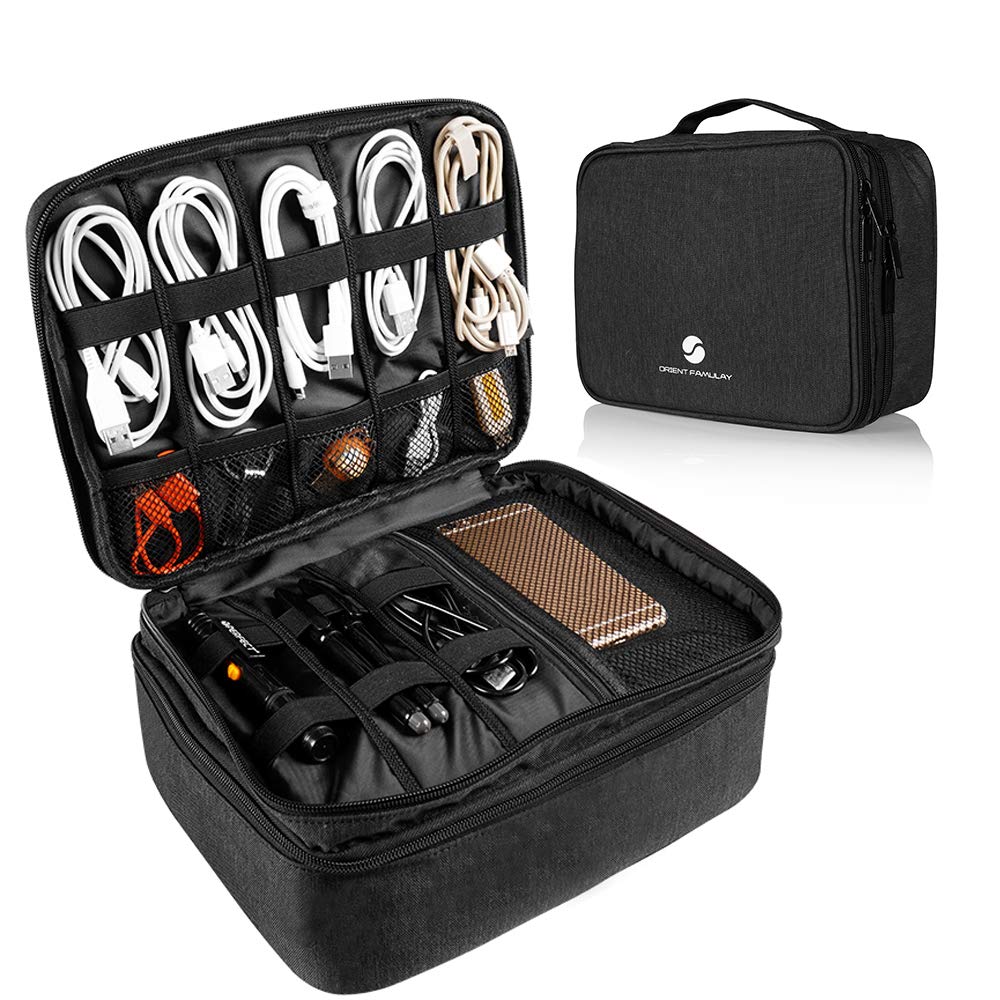
The ORIENT FAMULAY case accommodates an iPad up to 11 inches and a generous collection of cables, making it a viable option for travelers who need tablet storage alongside their tech accessories. However, the internal volume is smaller than the outer dimensions imply — some find it too snug for larger power banks or multiple adapters. Additionally, the sides lack rigid support, so the case can collapse under heavier loads, which diminishes its protective qualities. For buyers who prioritize a compact, waterproof organizer and don’t mind a softer shell, this fills the role, but the MATEIN alternative offers more predictable sizing and durability.
Pros
- Holds up to 15 cables and multiple power banks alongside an 11-inch tablet.
- Waterproof 900D nylon resists splashes and spills.
- Removable dividers and separate compartments keep gear organized.
Cons
- Outer dimensions suggest more space; some find it smaller than expected for their gear.
- Non-rigid sides can collapse under weight, reducing protection for contents.
Best suited for travelers who need a waterproof case for an iPad and cables but can work around a softer shell and slightly cramped interior.
Simtoper Slim Pouch
simtoper Slim Pouch

This slim pouch uses smooth-operating zippers and water-resistant polyester that holds up well to travel. The double-layer layout with elastic loops and mesh pockets organizes a few cables, earbuds, and a slim power bank without adding bulk to a backpack or purse. The compact size won’t fit larger charging bricks or long cables — a boundary for anyone with a standard charger. The zipper pull may detach from the slider over time, though in light use this tends to be a manageable inconvenience rather than a dealbreaker. For budget travelers with a minimal tech kit who want water resistance without spending much, this is a capable low-cost option.
Pros
- Smooth YKK-like zippers and water-resistant polyester at a low price point
- Compact and lightweight — fits easily in a purse or backpack without adding bulk
- Good internal organization with elastic loops and mesh pockets for cables and earbuds
Cons
- Zipper pull may detach from the slider over time
- Compact size won’t accommodate larger charging bricks or longer cables
Best suited for minimalists who carry only a few small accessories and want a low-cost, water-resistant pouch — not for those with larger adapters or heavy daily use.
Travelon Tech Accessory Organizer
Travelon Tech Accessory Organizer

The Travelon Tech Accessory Organizer rolls up flat and barely adds weight to your bag. Three compartments keep a phone charger, cable, and mouse separated. For someone who travels with minimal electronics, this is a tidy solution that packs out of the way.
The tradeoff is durability. The thin nylon fabric and plastic clip can wear or break after a few uses — this is a one-trip case at best. Capacity is also tight; a larger power bank or multiple cables won’t fit. That makes it a poor fit for regular travelers but a reasonable choice for occasional trips where weight is the priority.
Pros
- Rolls up or lays flat — easy to pack in any bag.
- Three compartments keep small accessories sorted without fuss.
- Holds a charger, cable, and mouse in a compact package.
Cons
- Plastic clip may snap during normal use.
- Size only accommodates a few small items — larger chargers may not fit.
Best for ultralight travelers who pack only a phone charger and cable and value minimal weight over long-term durability.
Luxtude Hard Shell
Luxtude Hard Shell

The Luxtude’s EVA hard shell and leather handle create a polished look that stands out among tech organizers. It offers solid protection for cables and small gadgets, and the compact size fits easily into backpacks. However, the zipper can jam or become difficult to close, which undermines its dependability for regular packing and unpacking. The interior is also on the smaller side, limiting what you can carry. This case suits occasional use or as a backup organizer where a zipper snag won’t cause major inconvenience.
Pros
- Hard shell protects cables and small electronics from being crushed in luggage.
- Sleek design with leather handle looks professional and fits any bag.
- Compact size slips into backpack pockets without adding bulk.
Cons
- Limited space may not fit larger power adapters or multiple cables.
- Zipper can get stuck or fail, reducing reliability for frequent use.
A decent choice for occasional travel or as a backup organizer where a stuck zipper isn’t a dealbreaker.
Pelican Electronic Organizer Travel Case
Pelican Electronic Organizer Travel Case

The Pelican organizer uses high-quality ballistic weave nylon that feels substantial, and the integrated AirTag pocket is a genuinely useful addition for tracking your gear. However, the premium price isn’t backed by a more advanced feature set; you’re paying extra for the brand name. The size falls into an awkward middle ground – too large for a minimalist pouch yet too small to hold a full travel tech kit. For the same price or less, the tomtoc large (the top pick in this category) delivers more interior space and comparable build quality. This case suits buyers who prioritize the AirTag integration and Pelican branding over raw value.
Pros
- Hidden AirTag pocket lets you locate the case via your phone if misplaced.
- Ballistic weave nylon construction offers a durable, professional look.
- Slim case holds cables, charger, and a power bank without bulging.
Cons
- Dimensions split opinions: too bulky for a small pouch yet not spacious enough for a full travel kit.
- Price feels high relative to the features offered – many competitors with similar materials cost half as much.
Best for buyers who specifically need the AirTag pocket or are loyal to Pelican – most travelers will find better value in the tomtoc large.
Matein Hard Shell
MATEIN Hard Shell

The MATEIN hard shell case delivers genuine crush protection with a rigid exterior and a fully customizable interior thanks to removable dividers – a practical option for musicians or DJs who need to safely transport sensitive electronics. The tradeoff is noticeable weight and bulk, which makes it less practical for travelers aiming to pack light. Some users also note that the internal space feels tighter than the outer dimensions suggest, especially for larger charging bricks. For those whose primary need is gear protection over portability, this case works well without surprises.
Pros
- Rigid hard shell protects delicate electronics from crushing in luggage
- Adjustable dividers let you tailor the interior layout for different gear
- Large capacity fits a surprising number of cables and small accessories
Cons
- Heavy and bulky – not suitable for carry-on only or minimalist packing
- Internal capacity can feel smaller than the exterior size suggests
Best suited for DJs, musicians, or anyone needing a rugged case for sensitive gear; less ideal for general travel where weight and space are priorities.
How to Choose
The single most important rule: measure your largest charging brick before buying — external dimensions don’t reveal whether a 65W adapter will fit the internal pockets.
Dimensions & Internal Layout
Look at the internal pocket height and width, not just the case exterior. Many pouches list generous outer dimensions but use narrow elastic loops that can’t hold a thick power bank. Check for dedicated compartments for larger items.
A double‑layer design often maximizes space without adding bulk. However, the top layer may only accept flat items like cables, while the bottom layer holds bricks. If you carry only one charger, a single‑layer case may suffice.
Materials & Zipper Quality
Zipper failures are the top durability complaint. Plastic zippers with thin pulls tend to snag or detach within weeks. Look for metal or branded zippers (YKK is common). Water‑resistant fabrics like coated polyester add protection but don’t guarantee zippers won’t leak.
Soft nylon cases collapse when underfilled, making items hard to retrieve. Hard shells keep their shape and protect against crushing, but add weight. For everyday carry, a semi‑rigid pouch offers a middle ground.
Capacity
Capacity descriptions like "holds 10 cables" are misleading because they assume thin, tangle‑free cords. In practice, a 65W laptop charger occupies about the same space as 4‑5 cables. Judge capacity by how many power bricks and long cables you actually carry.
A case that fits a small phone charger may fail for a GaN charger with foldable prongs. Check user photos that show a typical setup. For most travelers, a case that holds one power bank, one laptop brick, and three cables is enough.
Portability
A slim, flat case slides into a laptop bag without adding bulk, but limits what you can carry. A thicker, upright case fits better in a carry‑on or backpack with dedicated depth. Consider your primary bag’s internal compartments.
If you frequently access your cables mid‑flight, a case that stands open on a seat tray is useful. If you just want to store gear in a checked bag, any shape works — but hard shells protect better from shifting luggage.
Durability
Stitching, zipper build, and fabric thickness determine longevity. Cases with thin nylon or cheap zippers often fail after a few weeks of daily use. Look for reinforced stitching at stress points, especially around corners and zipper ends.
Rigid hard shells resist crushing but can crack if dropped. Soft shells are more flexible but offer less protection. For constant travel, a water‑resistant soft case with a high‑quality zipper is the most durable combination.
FAQ
Why do so many travel tech organizers have zipper problems?
Mass‑market cases often use low‑cost plastic zippers with thin pulls that snag or detach under normal use. The tension from a full case stresses the zipper track. To avoid this, prioritize cases with branded zippers (YKK) or metal pulls, and inspect user reviews for zipper complaints before purchase.
Can a 65W laptop charger fit in a travel cord organizer?
It depends on the charger’s physical size. Many 65W GaN chargers are compact enough for medium‑sized cases (e.g., tomtoc Travel Organizer). However, older brick‑style chargers are often too thick for elastic loops. Measure your charger’s dimensions and compare to the case’s internal pocket heights — not just the outer case size.
Is a hard shell or soft shell better for protecting electronics in a carry-on?
Hard shells offer better crush protection, which matters if your carry‑on gets stacked under heavy bags. Soft shells are lighter and more packable but provide no impact resistance. For checked luggage, a hard shell is safer; for a daily backpack, a soft shell is often sufficient.
How many charging bricks can a typical medium-sized tech organizer hold?
A medium case (1L capacity) usually fits one 65W laptop brick and one power bank, plus 2‑3 cables. Trying to fit two full‑sized laptop chargers will likely overstuff the case and strain the zipper. If you need multiple bricks, step up to a large pouch like the tomtoc Large Pouch.