
This post contains affiliate links. We may earn a small commission when you buy through our links — at no extra cost to you.
Flying through airport terminals with a dead laptop is avoidable, but many power banks fail to deliver their promised charge. A 25,000mAh bank might only give one full top-up to a 16-inch MacBook Pro, and shared ports can slow charging to a trickle. The real challenge is finding a power bank that balances raw capacity, real-world wattage, and travel-friendly weight.
Built-in cables and displays add convenience but often become failure points. Weight is unavoidable at high capacities—expect 1 to 1.5 pounds for 20,000mAh and above. The best portable laptop chargers combine proven reliability with features that actually save you time and clutter, not just the number on the box.
If you travel with a MacBook Pro or need to charge multiple devices simultaneously, prioritize a power bank with at least 100W per USB-C port and a track record of consistent performance. This guide focuses on those that deliver.


Best for Frequent Travelers
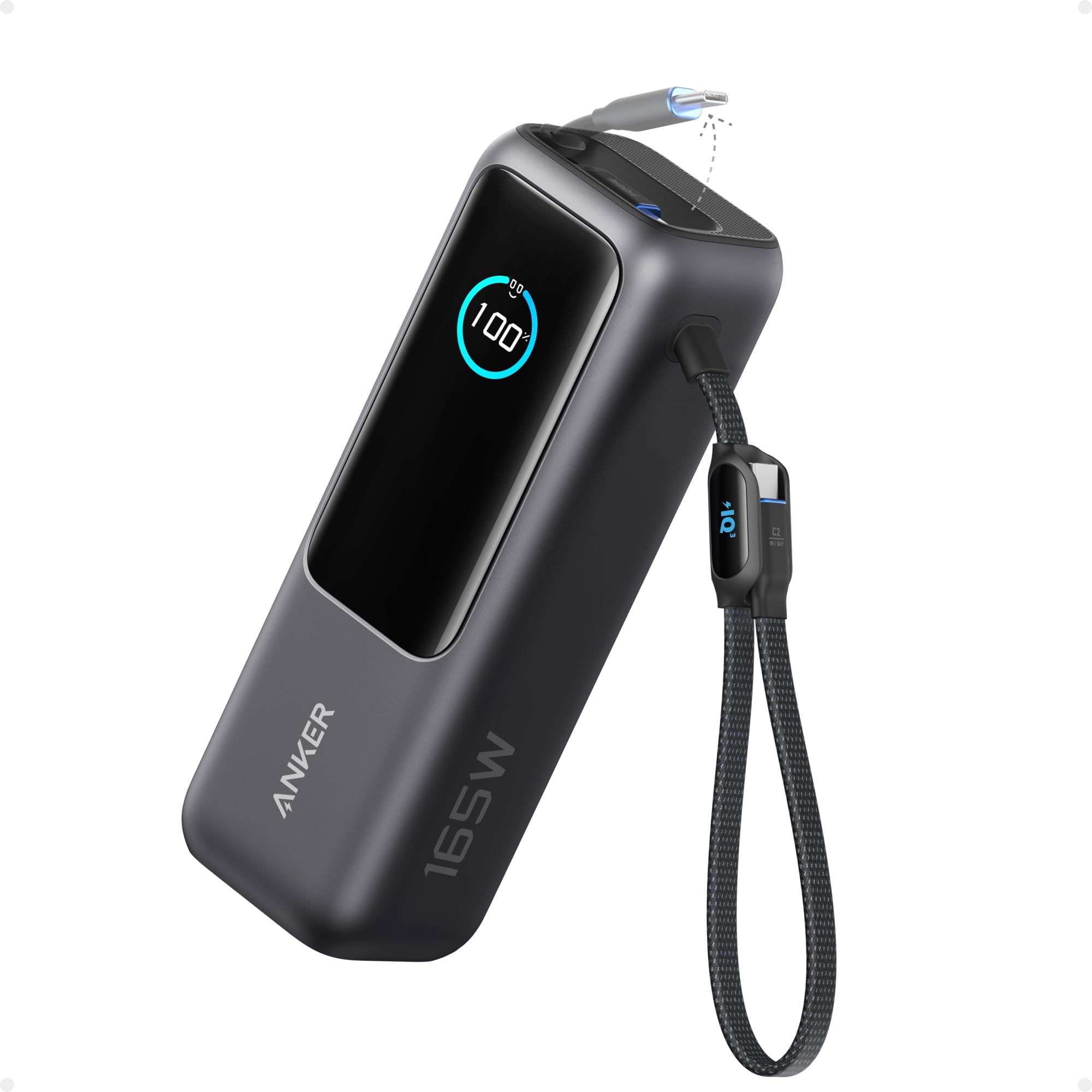
Anker 25K 165W Power Bank
Key Features
- Capacity: 25000mAh
- Max Output: 165W
- Ports: 3x USB-C, 1x USB-A
- Weight: 1.3 lbs
- Convenience: Retractable cables, display
- Price: Mid-Range
Three retractable USB-C cables eliminate the need to carry separate cords, and each port delivers up to 100W — enough to keep a MacBook Pro, an iPad, and an iPhone charging at full speed at the same time. The 25,000mAh capacity handles a full laptop recharge plus two phone top-ups before needing a refill itself.
In practice, the power bank maintains consistent output across all three ports. A 16-inch MacBook Pro draws the full 100W without throttling, while the secondary devices charge at their negotiated rates. The digital display shows remaining capacity and output in real time, so there’s no guessing how much power is left. Self-recharge from a 100W adapter takes about two hours — quick enough for a layover recharge between flights.
For frequent travelers and remote workers who need one device that charges everything, this is the closest to a true all-in-one solution. The weight of 1.3 lbs (589g) is unavoidable for a 25,000mAh pack with this output — it’s fine in a backpack or carry-on tote, but not something you’d want in a jacket pocket. If your priority is pocketability, a smaller 20,000mAh option like the compact model in this set will be easier to carry, though you lose the built-in cables.
The built-in cables are retractable and store flush into the side, so they don’t dangle or get tangled. The cable length is roughly eight inches — enough for a power bank sitting next to a laptop on a desk, but short for using the bank in a backpack while charging. Some users have noted occasional cable wear after extended use, though the retraction mechanism itself holds up well.
Pros
- All three USB-C ports output 100W, enabling simultaneous laptop, tablet, and phone charging.
- Battery maintains consistent capacity and output over dozens of charge cycles.
- Portable for a 25,000mAh bank; fits in a backpack side pocket without dominating space.
- High enough capacity to recharge a laptop fully and still top off multiple devices.
- Retractable cables stay organized and eliminate the need to pack separate charging cords.
Cons
- At 1.3 lbs it’s heavy for pocket carry — weight sits better in a backpack or tote.
- A small number of units can stop functioning after several months of use, possibly a manufacturing variance.
If you travel with a laptop and dislike juggling multiple cables, this power bank delivers exactly what it promises — high output, ample capacity, and built-in cables that stay put.
Best for Light Travelers
INIU 20K 65W Compact
Key Features
- Capacity: 20000mAh
- Max Output: 65W
- Ports: 2x USB-C, 1x USB-A
- Weight: 13.4 oz
- Convenience: Lanyard cable, LED display
- Price: Budget
The INIU 20K 65W stands out by fitting a 20,000mAh capacity into a 13.4-ounce package that slides into a pouch or jacket pocket easily – a rare compromise between capacity and portability in this price range. Where many power banks in this segment add bulk for higher wattage or extra ports, this one keeps the footprint tight, making it a natural companion for lightweight ultrabooks like the MacBook Air or Dell XPS 13. The 65W output handles a single laptop top-up, though the charging pace can be inconsistent when you need a quick boost – some reports note speed variations that slow down a full charge compared to more consistent 100W competitors.
This bank suits travelers and commuters who carry a laptop but only need occasional top-ups between meetings or flights. The dense battery adds noticeable heft in hand (380g) – fine in a bag, less comfortable in a pocket. For students who pack a laptop and phone, the dual USB-C and USB-A ports charge multiple devices at once, but the 65W total output means simultaneous laptop and phone charging will be slower than a dedicated laptop charger. If you rely on your laptop for a full day of heavy work, the capacity and speed may fall short; look for a higher-wattage pack with larger capacity instead.
Pros
- Power delivery remains stable across multiple charges – no unexpected drops in output.
- Soft-touch casing and solid construction withstand regular travel use.
- 20,000mAh capacity in a pack that fits inside a small bag compartment.
- Two USB-C and one USB-A ports allow charging a laptop, phone, and earbuds at once.
Cons
- Dense battery makes the pack feel heavier in hand than its compact size suggests.
- Laptop charging speed can vary between units – some experience slower top-ups than expected.
For travelers who want a compact backup that can give an ultrabook a few extra hours without adding much weight, this INIU fits the bill. Just don’t count on it as your primary laptop charger for demanding days.
Best for Value Seekers
UGREEN 20K 130W TFT
Key Features
- Capacity: 20000mAh
- Max Output: 130W
- Ports: 2x USB-C, 1x USB-A
- Weight: 1.06 lbs
- Convenience: TFT display
- Price: Budget
The UGREEN Nexode stands out with its cylindrical shape and a TFT display that shows current wattage, remaining time, and charge cycles. Most power banks hide this data behind tiny LED dots or vague bars; here, the information is precise and easy to read, making it a natural fit for tech enthusiasts who want to know exactly what’s happening during a charge.
Charging performance is consistent: the 100W USB-C port powers a MacBook Pro from empty to 50% in about 30 minutes, and the 65W input recharges the bank itself in under two hours. The 72Wh capacity fits easily into a carry-on and handles a full phone charge plus a laptop top-up, making it a capable travel companion for light to moderate use.
This is a strong choice for travelers who appreciate a distinctive form factor that packs easily, or for value buyers seeking high output without a premium price. However, a small number of units have shown charging irregularities after months of use — worth checking the return policy if buying for heavy daily travel.
Pros
- Real-time TFT display shows charging power and remaining time
- Cylindrical design slips into pockets and bags with ease
- Fast 100W single-port output charges laptops quickly
- Solid build quality with a well-constructed matte finish
Cons
- A minority of units may develop charging inconsistencies after extended use
If you want a power bank that tells you exactly what it’s doing and avoids the usual rectangular brick, the UGREEN Nexode delivers high-speed charging with a design twist — just be aware of the occasional long-term durability hiccup.
Best for Business Travelers
UGREEN 20K 165W with Cable
Key Features
- Capacity: 20000mAh
- Max Output: 165W
- Ports: 2x USB-C, 1x USB-A, built-in cable
- Weight: 1.17 lbs
- Convenience: Retractable cable, TFT display
- Price: Mid-Range
The UGREEN Nexode’s retractable USB-C cable removes the need to carry a separate charging cord, while its 165W total output handles laptops, tablets, and phones from a single battery pack. It’s one of the few power banks that integrates a cable without sacrificing fast charging speed.
This model suits business travelers who value a tidy kit and need 100W Power Delivery for a 14-inch or 16-inch laptop. The 20,000mAh capacity is adequate for a full workday of top-ups but falls short of larger packs that can recharge a laptop twice plus a phone. Some units have shown capacity loss over extended use, so it’s best for moderate daily charging rather than heavy all-day reliance.
The TFT display shows remaining charge percentage and output wattage in real time, a helpful detail for monitoring charging progress. A USB-A port adds flexibility for older devices, and the 100W input recharges the bank itself in just over an hour.
Pros
- Fast charging speeds for laptops and phones
- Battery maintains capacity well during the first year
- Consistent output when charging multiple devices at once
Cons
- 20,000mAh provides fewer full laptop charges than larger-capacity alternatives
- Some units may experience gradual capacity reduction after months of use
A well-executed travel companion for anyone who wants one cable to rule them all — just don’t expect marathon capacity.
Best for Power Users
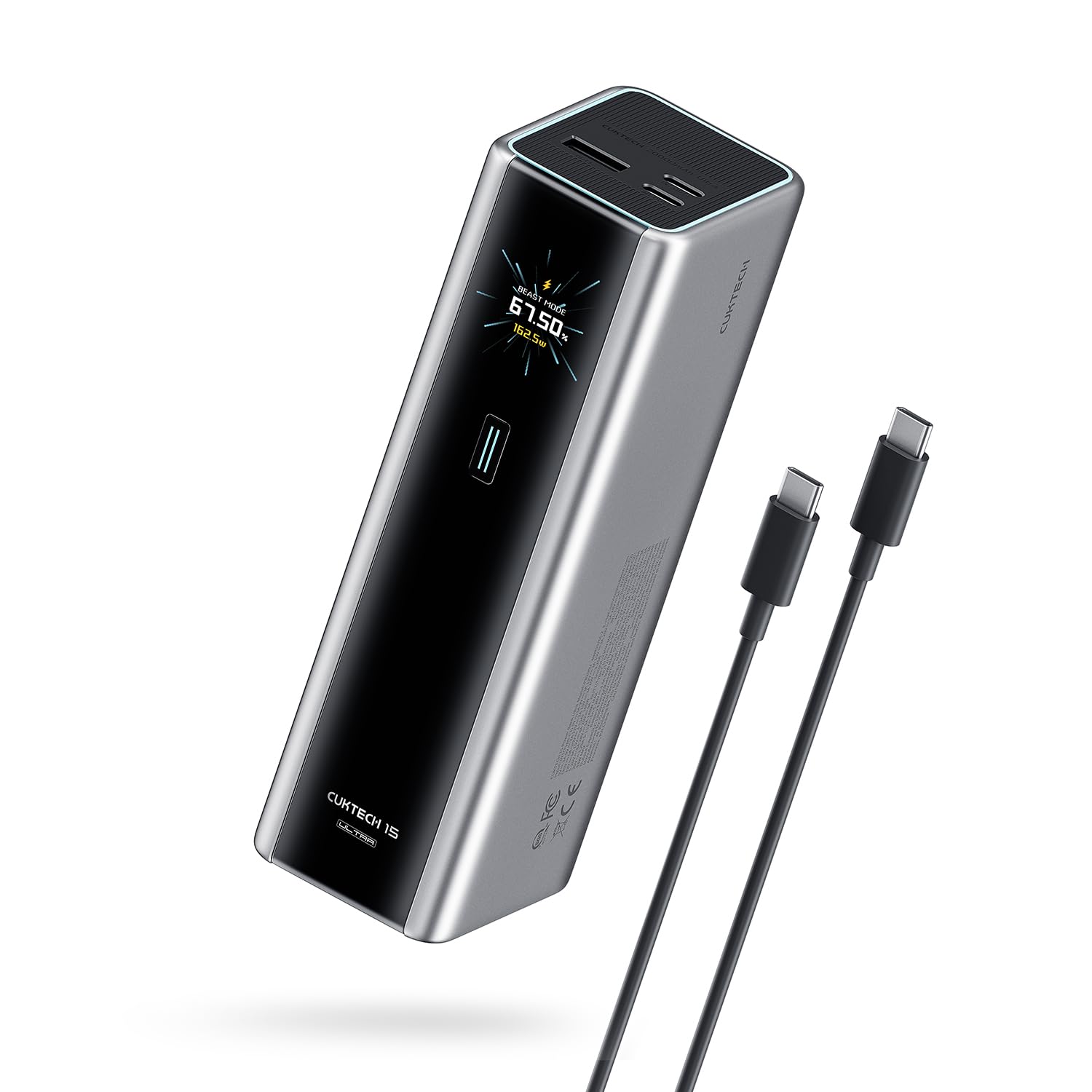
CUKTECH 20K 140W
Key Features
- Capacity: 20000mAh
- Max Output: 165W
- Ports: 2x USB-C, 1x USB-A
- Weight: 1.3 lbs
- Convenience: TFT display, fast recharge
- Price: Mid-Range
165W dual-port input recharges to 70% in 20 minutes — that’s the fastest self-recharge among comparable 20,000mAh power banks. Combined with a 140W single-port output, it matches the top pick’s laptop charging speed while topping up its own battery in a fraction of the time. The omission of built-in cables keeps the price mid-range and makes this a focused tool for those who prioritize recharge speed over convenience features.
This is best for early adopters who value rapid turnaround and don’t mind carrying a separate USB-C cable. The 1.3-pound weight is standard for 20,000mAh with 140W output, but it’s noticeable in a jacket pocket. Long-term behavior under heavy use is still being established — early reviews suggest sturdy build, but the sample is small. Buyers who need a longer track record should consider the top pick with its extensive feedback base.
The TFT display shows real-time wattage, capacity, and estimated time, giving precise feedback during charging. Beast mode unlocks the full 165W input, though a compatible 140W+ charger is needed to hit those speeds. For daily top-ups with standard chargers, it still charges faster than most competitors.
Pros
- Fastest self-recharge in its class — 70% in 20 minutes with 165W input.
- Sturdy build that holds up during travel and daily use.
- 140W single-port output charges large laptops at full speed.
- TFT display provides real-time charging data for precise monitoring.
Cons
- No built-in cables — you’ll need to carry a separate USB-C cable for each device.
- At 1.3 pounds, it’s heavier than some 20,000mAh competitors, less suited for pocket carry.
- 165W input speed only applies when paired with a 140W+ USB-C charger — slower with standard chargers.
For anyone who values getting back to full power fast and doesn’t mind an extra cable, the CUKTECH delivers impressive recharge speeds without the top pick’s premium. Its limited track record is the main reason to weigh alternatives.
Best for Power Users
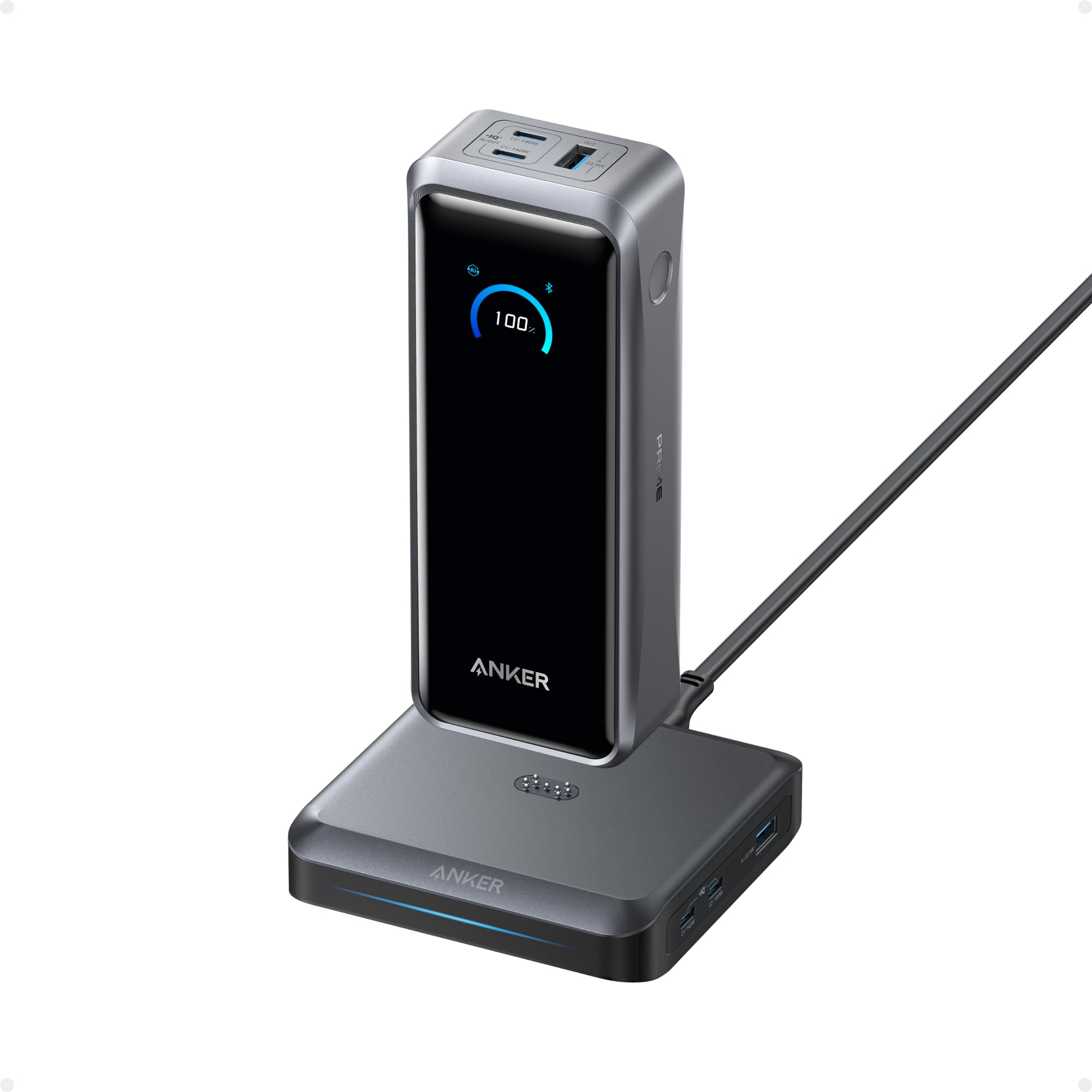
Anker Prime 26K 300W
Key Features
- Capacity: 26250mAh
- Max Output: 300W
- Ports: 2x USB-C, 1x USB-A
- Weight: 1.3 lbs
- Convenience: Charging base, app control
- Price: Luxury
The Anker Prime delivers 300W total output through two USB-C and one USB-A port, with a charging base that eliminates cable clutter at a desk. Its 250W input refills the 26,250mAh capacity in less than an hour, and the smart display and app provide real-time monitoring. However, this level of performance carries a premium price that only makes sense if you regularly charge multiple high-power laptops. The bulk and app-controlled features are overkill for most travelers — a simpler, lower-cost model with retractable cables like the top pick serves travel needs better.
Pros
- Delivers 300W total output across three ports – enough to charge a laptop, tablet, and phone simultaneously.
- Recharges from empty to full in under an hour thanks to 250W input, minimizing downtime.
Cons
- Premium pricing only makes sense if you routinely need 300W output and the charging base – casual users pay for unused capability.
Best suited for professionals who charge multiple high-power laptops daily and want the fastest possible recharge cycle.
Best for Budget Shoppers
Anker Zolo 20K 45W

Key Features
- Capacity: 20000mAh
- Max Output: 45W
- Ports: Built-in cable, 1x USB-C, 1x USB-A
- Weight: 0.78 lbs
- Convenience: Built-in cable
- Price: Budget
The built-in USB-C cable and low price make this a convenient choice for anyone who charges phones and tablets daily. That same 45W output, however, is slow for most laptops — expect gradual charge gains rather than rapid refills. The unit can feel heavier and bulkier than other 20,000mAh packs, which matters if you plan to carry it in a jacket pocket. For phone-first users who occasionally top up a laptop, the tradeoff may be acceptable; for anyone who needs consistent laptop charging speed, a 65W or higher option is worth the extra cost.
Pros
- Built-in USB-C cable eliminates the need to carry a separate cord
- Fast charging for phones and tablets
Cons
- 45W output is slow for most laptops – only suitable for gradual top-ups
- Heavier and larger than some 20,000mAh alternatives, which can affect pocket carry
A decent option for phone-dominant users who value a built-in cable and a low price, but skip it if laptop charging speed is a priority.
Best for Early Adopters
Vention 27K 200W Power Bank

Key Features
- Capacity: 27000mAh
- Max Output: 200W
- Ports: 2 built-in cables, 2x USB-C, 1x USB-A
- Convenience: Built-in cables, 240W cable
- Price: Mid-Range
The Vention Powerhive offers the largest capacity and highest total output in this comparison, and early user experiences indicate it delivers fast charging for laptops and phones. Its 27,000mAh capacity and 200W total output outspec most competitors, and the included built-in cables plus an extra 240W cord reduce the need to carry separate adapters. However, the product is too new to have broad customer feedback on real-world charging behavior and long-term consistency — buyers should treat it as a speculative purchase until more experience accumulates.
Pros
- Fast charging speeds for laptops and phones (140W single, 200W total).
- Built-in USB-C cables reduce cable clutter, plus an extra 240W cable included.
Cons
- At roughly 1.2 pounds, it adds noticeable weight to a travel bag.
- The fixed built-in cables lack a retractable mechanism for tidy storage.
Best suited for early adopters who want maximum capacity and output and are comfortable with limited long-term data.
How to Choose
The most important thing to know is that a power bank’s advertised capacity is not what your laptop will receive – you lose about 20-30% due to voltage conversion and heat.
Battery Capacity
Battery capacity in milliamp-hours (mAh) determines how many full charges you get. A 20,000mAh power bank typically delivers about 12,000-14,000mAh to a laptop because USB-C voltage conversion is inefficient. For a 16-inch MacBook Pro (8,700mAh battery), that’s roughly 1.5 charges.
A 25,000mAh bank offers about 1.8-2 charges for the same laptop, but adds 3-5 ounces more weight. If you only need a single top-up, a 20,000mAh unit saves bulk. For full-day work away from outlets, 25,000mAh+ is safer.
Max Output Wattage
Laptop charging speed depends on the power bank’s max wattage per USB-C port. Most modern ultrabooks charge at 65W, while larger laptops like the MacBook Pro 16 require 100W. A 100W port can top up a 65W laptop at full speed, but that wattage drops when sharing with another device.
Power banks split total wattage across active ports. Charging a laptop and phone simultaneously may cut laptop speed by 20-30%. For simultaneous charging, look for banks with at least 100W per port and a high total output (e.g., 165W).
Number and Type of Ports
USB-C Power Delivery ports are essential for laptop compatibility. Two or more USB-C ports allow charging a laptop and phone simultaneously. Some banks include USB-A ports for older devices, but USB-A typically delivers only 12-18W – too slow for laptops.
Built-in cables are convenient but are often the first component to fail. A separate high-quality USB-C cable is more durable. If you opt for built-in cables, ensure they are retractable and securely attached to avoid wear from constant coiling.
Weight and Dimensions
High-capacity power banks are inherently heavy – expect 1 to 1.5 pounds for 20,000-25,000mAh. Every 5,000mAh increment adds roughly 0.2-0.3 pounds. A 1.3-pound battery pack is noticeable in a jacket pocket but disappears in a backpack or carry-on.
Form factor matters for travel. Cylindrical designs fit easily into side pockets, while rectangular blocks stack neatly. A slim 20,000mAh bank like the INIU 13.4-ounce model is comfortable for daily carry, but its 65W output limits laptop charging speed.
Convenience Features
Built-in cables, digital displays, and fast self-recharge reduce hassle but add cost and potential failure points. A display showing remaining percentage and wattage helps manage charge levels. Fast self-recharge (100W+ input) refills the bank in under 2 hours – useful for tight layovers.
Retractable cables are a trade-off: they save packing time but are harder to replace if damaged. Banks with replaceable cables or separate high-quality cables are more durable. Also look for TSA-friendly labeling (100Wh or less) if you fly often.
FAQ
Why does my laptop power bank stop charging after a few months?
Most failures are caused by degraded battery cells or faulty internal voltage regulators. Cheap power banks often use lower-quality cells that lose capacity quickly. Storing the power bank at extreme temperatures (below 32°F or above 95°F) can also accelerate degradation. If your unit dies early, it’s a sign of poor construction – choose a bank from a brand with thousands of reviews and proven long-term reliability.
Can I take a 25,000mAh power bank on a plane?
Yes, as long as its watt-hour rating is under 100Wh. A 25,000mAh bank at 3.7V equals 92.5Wh – under the 100Wh limit. You must carry it in your hand luggage; check the airline’s specific policy before flying. Some brands list the Wh rating on the label, which you can show at security.
How much laptop battery can a 20,000mAh power bank actually charge?
A 20,000mAh power bank delivers roughly 12,000-14,000mAh to a laptop due to conversion losses. For a 13-inch MacBook Pro with a 6,000mAh battery, that’s about two full charges. For a 16-inch MacBook Pro with an 8,700mAh battery, you get about 1.3 to 1.6 charges. If you need a full day of work away from outlets, a 25,000mAh bank is more reliable.
Is it safe to leave a power bank charging overnight?
Modern power banks with overcharge protection circuits stop charging once full, so it is generally safe. However, prolonged connection to a charger after full capacity can slowly degrade the battery’s lifespan. It’s best to unplug within an hour of reaching 100%. Avoid charging on flammable surfaces or in direct sunlight.