
This post contains affiliate links. We may earn a small commission when you buy through our links — at no extra cost to you.
Most travel tablets claim ‘up to 13 hours’ of video playback, but real-world use with brightness up and Wi‑Fi on often falls short. Add in the cramped cabins and jostling carry‑ons, and you quickly learn why screen durability and a true day‑long battery matter.
This guide focuses on the portability and power balance that actually holds up on a cross‑country flight: 10 to 11‑inch screens large enough for movies without weighing down your bag, battery estimates backed by user experience, and software that works without juggling workarounds. You’ll also see how the choice between an all-around media tablet and a stylus‑equipped note‑taker changes what you pack and spend.





Best for Media & Families
Samsung Tab A11+
Key Features
- Screen & Resolution: 11" 1920×1200, 90Hz
- Battery Life: 26.34 Wh, fast charge
- Weight: 1.1 lbs
- OS & App Ecosystem: Android (One UI)
- Price: Budget
The 11-inch LCD panel delivers a crisp 1920×1200 picture with a smooth 90Hz refresh rate, making scrolling and video playback feel fluid. Combined with quad Dolby Atmos speakers, it transforms an airport lounge or hotel room into a private cinema that rivals tablets costing significantly more.
Streaming, browsing, and light gaming — from Netflix to Asphalt 9 — run without stutter thanks to the MediaTek MT8775 and 6GB of RAM. Battery endurance stretches through cross-country flights and back-to-back episodes, and fast charging tops up quickly during a layover, so you’re rarely tethered to a wall outlet.
Weighing barely a pound, the tablet slips into a seat-back pocket or messenger bag without adding bulk. Its textured back resists scuffs from travel chaos, and the 90Hz refresh rate makes even mundane scrolling feel responsive, turning downtime into a smooth, comfortable experience.
The Tab A11+ fits travelers who prioritize media consumption, casual browsing, and reading over productivity. Its slim profile and 1.1 lb weight vanish into a daypack, and the 128GB of storage (expandable via microSD) holds enough offline content for weeks away from reliable Wi-Fi. Note that quick-sharing and syncing with non-Samsung devices can be hit-or-miss; those who use a Google Pixel or other Android phone may find file transfers less smooth than everyday Samsung users. For note-taking or heavy creative work, Samsung’s S Pen-equipped alternative — the pricier tab with 16-hour battery — better suits that need.
At its budget-friendly price, the Tab A11+ undercuts tablets that skimp on screen quality or lock you into proprietary app stores. The full Google Play library and Samsung’s UI polish give it a versatility that budget Amazon slates lack for travel apps like Google Maps, offline translators, and eBook readers.
Pros
- Smooth everyday performance for streaming, browsing, and light gaming without lag.
- Exceptional value with a vivid screen and room-filling Dolby Atmos audio at a fraction of the price of premium tabs.
- Bright, crisp 11-inch 90Hz display keeps movies and web pages looking sharp even in daylight.
- All-day battery life that refuels quickly enough for back-to-back travel days.
- Expandable storage via microSD lets you load up entire seasons and offline maps without worrying about space.
Cons
- File sharing and syncing with non-Samsung devices may be inconsistent, requiring workarounds for mixed-device setups.
For travelers who want an 11-inch screen with vivid picture, all-day battery, and full Google Play access in a sub-$250 frame, the Tab A11+ delivers where many budget alternatives fall short. Those who need a stylus or flawless cross-device connectivity should look to Samsung’s premium S Pen-equipped model.
Best for Students & Notetakers
Lenovo Idea Tab
Key Features
- Screen & Resolution: 11" 2560×1600, 90Hz
- Battery Life: 26.7 Wh, 12h video
- Weight: 1.1 lbs
- OS & App Ecosystem: Android
- Price: Mid-Range
Its 2.5K IPS display delivers noticeably sharper text and richer colors than the top pick’s 1080p panel, and the included active pen writes with low latency that holds up during long note-taking sessions. The aluminum frame and bundled folio case give it a premium feel that travels well, while the 12-hour video playback means it can last a cross-country flight without needing a charge. At 1.1 lbs, it’s light enough to hold in one hand during a cramped seat.
This tablet fits college students and professionals who regularly take notes, mark up PDFs, or sketch ideas while on the move. The MediaTek Dimensity 6300 handles multitasking across note-taking apps, web browsing, and streaming without hesitation. Heavy gaming or 4K video editing will push its limits – but for the travel workloads this is designed for, performance stays consistent. The 256GB of onboard storage and expandable slot provide room for offline media libraries.
Pros
- Premium aluminum build feels solid and resistant to travel bumps
- Included pen and folio case add value over buying accessories separately
- 2.5K display offers crisp text and accurate colors for reading and drawing
- 8GB RAM handles note-taking apps and web browsing without lag
Cons
- Dual speakers are adequate for personal listening but lack the richness for group movie sessions in a hotel room
The Idea Tab is the right pick for travelers who value a high-res screen and a pen for notes or sketches – just don’t expect it to double as a gaming or editing machine.
Best for Entertainment
Lenovo Tab Plus
Key Features
- Screen & Resolution: 11.5" 2000×1200, 90Hz
- Battery Life: 8600 mAh, 12h
- Weight: 1.43 lbs
- OS & App Ecosystem: Android
- Price: Mid-Range
The Tab Plus centers its experience around an eight-speaker JBL array that pushes audio far beyond what typical travel tablets attempt. With the integrated metal kickstand deployed, it transforms into a standalone Bluetooth speaker, filling a hotel room without external accessories.
The 11.5-inch 2K panel refreshes at 90Hz, keeping motion smooth during movies, and brightness holds up under daytime window light. 128GB of storage and 8GB of RAM handle offline downloads and light multitasking without slowdowns. A metal chassis and a hinge that stays put on tray-table edges give the tablet a more anchored feel than plastic-bodied alternatives.
Travelers who prioritize cinematic audio-visual experiences will appreciate what this tablet offers at its mid-range price. The tradeoff is weight—at 1.43 lbs, it’s heavier than many 11-inch competitors, which makes one-handed reading or standing use less comfortable. The Tab Plus is strongest when propped on a surface, making it a natural fit for hotel nights and family shared use rather than minimalist packing.
Pros
- Eight JBL speakers produce room-filling sound and can function as a standalone Bluetooth speaker for music.
- The 11.5-inch 2K, 90Hz display remains bright and crisp for streaming in daylight or low-light conditions.
- Metal chassis and kickstand feel sturdy, with a hinge that holds position on uneven surfaces.
- Generous 128GB storage and 8GB RAM at a mid-range price outpaces many audio-focused competitors.
Cons
- At 1.43 lbs, it’s noticeably heavier than typical travel tablets, which can tire hands during long reading sessions.
When after-hours entertainment is the priority, the Tab Plus’s speaker setup and screen offer an experience that lighter, pen-focused tablets can’t replicate—just plan to use it desk-side.
Best for Ultra-Portable Use
Lenovo Tab One
Key Features
- Screen & Resolution: 8.7" 1340×800, 60Hz
- Battery Life: 19.55 Wh, 12h video
- Weight: 0.7 lbs
- OS & App Ecosystem: Android
- Price: Budget
The Lenovo Tab One ships with a folio case already in the box, so you don’t need to budget for protection — and at 0.7 pounds, it’s the lightest Android tablet in this travel set. Where the pen-equipped option in this group stretches to a larger, higher-resolution screen, the Tab One prioritizes compactness that slides into a jacket pocket or purse without a second thought. Its 12-hour video battery is a genuine asset on day-long journeys where outlets are scarce.
Travelers who stream movies, read Kindle books, or hand the tablet to a child for games will find the performance adequate. The MediaTek Helio G85 processor handles a single app smoothly, but opening multiple apps or keeping music streaming in the background while browsing can introduce noticeable lag. That tradeoff keeps the price down and the battery drain modest, so it’s a fair exchange for solo-task journeys where you only need one app at a time.
The 8.7-inch LCD’s 1340×800 resolution is not pin-sharp, but text stays readable and colors remain acceptable for casual watching. A microSD slot lets you load up offline content without worrying about the 64GB internal storage. Setup requires little more than signing into a Google account, and the interface stays close to stock Android — no heavy skins to slow things down further.
At its budget-friendly price, the Tab One undercuts most competitors while including the case, making it a practical spare tablet for family trips or a dedicated travel device that won’t cause anxiety if accidentally left in a hotel room. The sub-one-pound build and bundled cover mean you can hand it off to a restless kid without hunting for accessories.
Pros
- Very light and compact, ideal for one-handed use
- Good battery life for its size
- Great value for money
- Easy to set up and use
Cons
- Performance can slow noticeably when multiple apps are open
If your travel tech checklist prioritizes weight over multitasking, the Lenovo Tab One fades into your carry-on without becoming a burden.
Best for Productivity & Creativity
Samsung Tab S10 Lite
Key Features
- Screen & Resolution: 10.9" 2112×1320, 90Hz
- Battery Life: 8000 mAh, 16h
- Weight: 1.16 lbs
- OS & App Ecosystem: Android (One UI)
- Price: Premium
Where the best media-focused travel pick shines with speakers and streaming, the Tab S10 Lite pivots to creation. The bundled S Pen and DeX desktop mode turn a small hotel desk into a functional workstation for marking up PDFs, sketching layouts, or running two apps side by side. An Exynos 1380 processor keeps split-screen multitasking lag-free, and photo edits in Lightroom require no waiting. The 8000mAh battery sustains a full workday on a single charge, so you can leave the power bank in your bag. The build feels solid and premium, with a 10.9-inch display that renders notes and Netflix with equal clarity.
This tablet fits the traveler who travels with a stylus in hand—architects, students, or anyone who annotates reports on planes. The S Pen instantly slots into the magnetic back, so it’s always ready for sudden ideas. At 1.16 pounds, the weight becomes apparent during long one-handed reading sessions; those who mostly use the tablet propped on a tray table or folded open as a laptop-lite won’t notice. If your trip includes more markup and multi-tasking than passive media, the S10 Lite delivers that productivity without the bulk of a full laptop.
Pros
- Aluminum chassis with a polished feel that withstands daily packing.
- S Pen and DeX mode enable desktop-class multitasking for light editing and annotations.
- 10.9-inch display keeps notes crisp and videos vibrant with a 90Hz refresh rate.
- 16-hour battery life covers long flights and full workdays without hunting for an outlet.
Cons
- At 1.16 lbs, one-handed reading for extended stretches can feel fatiguing.
For the traveler who sketches, marks up documents, or wants a laptop-lite desktop mode in a tablet, the S10 Lite makes a strong case over entertainment-first alternatives—just factor in the extra weight if you plan to hold it upright for hours.
Best for Amazon Ecosystem
Fire HD 10

Key Features
- Screen & Resolution: 10.1" 1920×1200
- Battery Life: 13h video
- Weight: ~1.1 lbs
- OS & App Ecosystem: Fire OS
- Price: Budget
The Fire HD 10’s 10.1-inch Full HD display and 1.1-pound body slip easily into a carry-on, while tight Amazon integration makes Prime Video, Kindle, and Audible feel native. The screen holds up well in varied lighting, and the build feels sturdy enough for a seatback pocket.
The tablet runs Fire OS, which excludes the Google Play Store entirely. That removes Google Maps, Chrome, and Docs—apps many travelers rely on for offline navigation and document work. Amazon’s own Appstore offers alternatives, but the gap is real. Performance stays adequate for streaming and reading, though heavier apps can introduce noticeable lag. Battery endurance is enough for a long flight, but capacity may drift downward after a year of daily use. This is a dedicated media slate, not a general-purpose travel computer.
Pros
- Crisp 10.1-inch Full HD screen works well for movies and reading in transit.
- Light 1.1-pound design and durable body fit easily in a travel bag.
- Seamless Amazon Prime Video and Kindle experience for binge-watching on the road.
Cons
- No Google Play Store means Google Maps, Chrome, and Docs are unavailable for offline travel use.
- App loading and multitasking can feel slow with non-Amazon apps.
- Battery runtime may diminish after a year of regular use.
A sensible travel companion for Amazon Prime subscribers who want a lightweight screen for watching and reading, and can live without Google’s navigation and productivity tools.
Best for High-Res Display
Xiaomi Redmi Pad 2

Key Features
- Screen & Resolution: 11" 2560×1600, 90Hz
- Battery Life: 9000 mAh
- Weight: 1.12 lbs
- OS & App Ecosystem: Android
- Price: Mid-Range
The Xiaomi Redmi Pad 2 delivers a crisp 11-inch 2.5K 90Hz screen and fluid daily performance in a slim metal shell, making it a compelling media companion for travelers who value display fidelity above all else. Its 8GB RAM and 256GB storage handle streaming, browsing, and multitasking without stutter — all at a price that significantly undercuts comparable big-brand tablets.
Battery life under heavy use can dip to 4–5 hours, noticeably shorter than the spec sheet implies, and speaker volume sits at average levels, so noisy environments pose a challenge. The global ROM also lacks a US warranty; any support needs fall on you. For solo movie watching and reading near an outlet, the screen and build outshine most rivals. All-day travelers who need untethered endurance will find the top pick a stronger match.
Pros
- Sharp 2.5K 90Hz display rivals more expensive tablets for detail and motion smoothness.
- 8GB RAM and Helio G100 Ultra keep app switching and streaming responsive under typical loads.
- Competitive pricing for a metal unibody with 256GB storage, undercutting similar name-brand options.
Cons
- Speaker volume is average — in loud settings, dialogue may be hard to hear without headphones.
- Battery life under heavy use can drop to 4–5 hours, shorter than advertised for media-heavy trips.
If a stunning 2.5K screen for movies and reading is the priority and you can stay near a power source, this tablet punches above its weight — but all-day travelers should grab the top pick with longer endurance and quad speakers.
Best for Reading & Browsing
TCL Tab 10 Gen 4
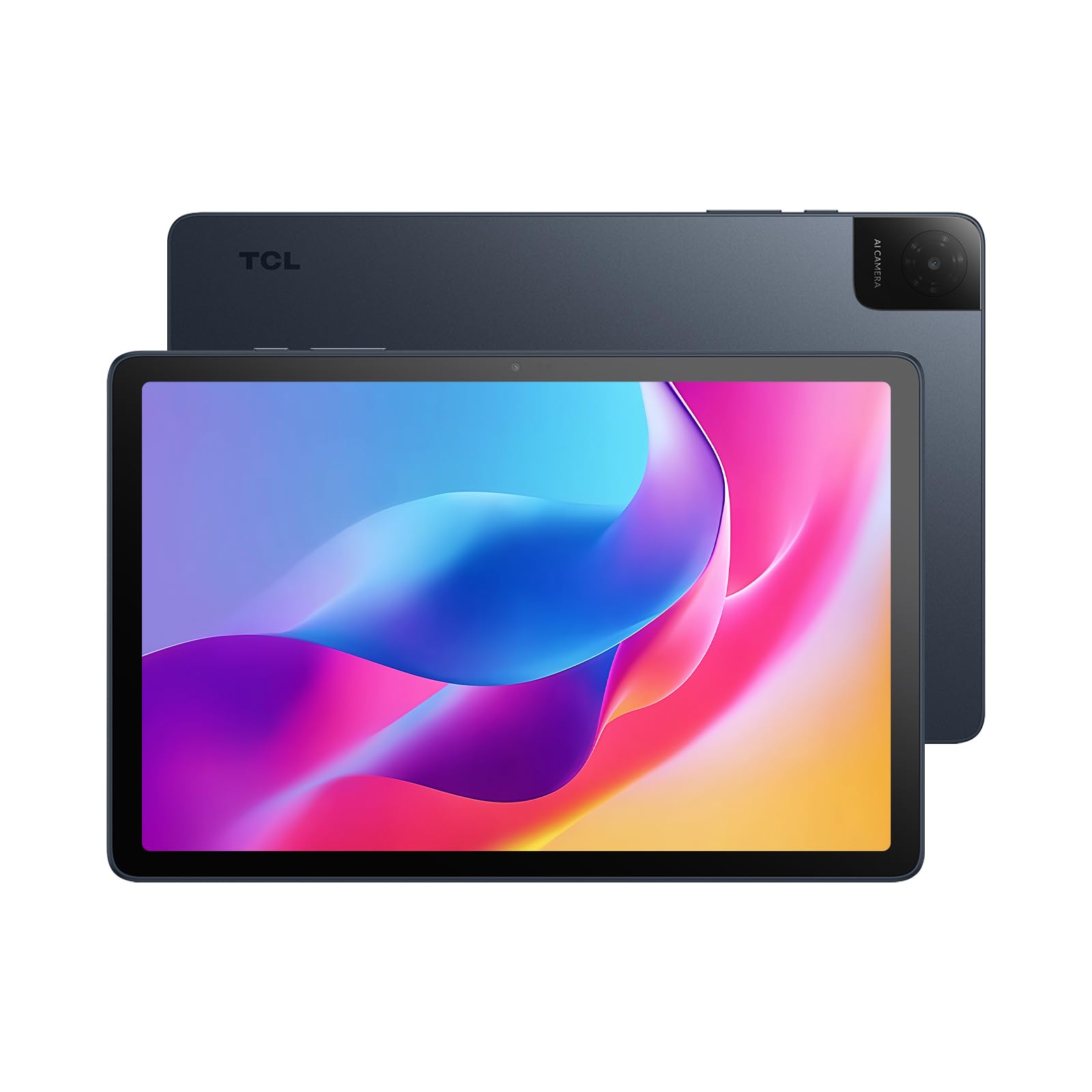
Key Features
- Screen & Resolution: 10.1" 1920×1200, 60Hz
- Battery Life: 6000 mAh
- Weight: 0.87 lbs
- OS & App Ecosystem: Android 15
- Price: Budget
For travelers who prioritize a lightweight device for reading and streaming at a very low price, the TCL Tab 10 Gen 4 makes a strong case. Its 0.87-pound frame and reading mode display excel for extended ebook sessions on planes. However, boot times can feel drawn out, and switching between apps may lead to occasional stutters. Battery life, while adequate for short stints, can dip below the claimed 16 hours with video playback, making all-day use less predictable. This tablet best suits readers and casual browsers who don’t need rapid multitasking or uninterrupted power on long travel days.
Pros
- Outstanding value for a tablet with 128GB storage and a Full HD screen.
- Reading mode display reduces eye strain during long reading sessions.
- Remarkably light at 0.87 lbs, easy to hold for hours.
Cons
- Battery life can fall short of the 16-hour claim during video playback, requiring more frequent charging on long days.
- The tablet takes noticeable time to start up, and may stutter when several apps are open.
For casual reading and light media on a tight budget, this is a contender, as long as you don’t need instant-on access or all-day unplugged reliability.
How to Choose
A tablet’s real-world battery endurance and how it handles a bright screen during a long flight matter far more than the spec sheet claims.
Screen Size & Resolution
An 11-inch screen hits the travel sweet spot—it’s large enough for movies and maps but still fits in a carry‑on without adding bulk. Pushing beyond 11.5 inches makes the tablet harder to hold one‑handed and more prone to wobble on a tray table when the person in front reclines.
Resolution above Full HD on a 10–11 inch panel is mostly a bonus for crisp text and detailed photos; a standard 1920×1200 screen already looks sharp at arm’s length. If you’ll use it primarily for video, prioritize brightness and refresh rate (90Hz makes scrolling smoother) over 2.5K that you may only notice when reading tiny labels on maps.
Battery Life & Charging
Manufacturers quote run‑times based on 50% brightness and airplane mode. In a plane or train cabin with Wi‑Fi streaming, screen at 80% brightness, and background apps syncing, expect half the claimed figure. A tablet rated for 13 hours often yields 6–7 hours of real mixed use.
Fast charging matters when you have a 40‑minute layover to top up. Models that support 15W or faster USB‑C Power Delivery can regain over 40% in thirty minutes, while older 5W charging may need hours. Check whether the tablet includes a fast charger in the box, because budget models often bundle only a basic cable.
Weight & Ergonomics
Holding a tablet above your chest for a two‑hour movie strains your wrist quickly. Tablets under 1.2 lbs feel comfortable for extended handheld use; above 1.3 lbs, fatigue sets in after 20–30 minutes. A folio case or built‑in kickstand shifts the load to the tray table and is worth the extra ounces for long flights.
Ultra‑portable 8.7‑inch slates weigh as little as 0.7 lbs and slip into a jacket pocket, but the smaller screen limits split‑screen reading or viewing maps alongside a video. If you regularly pack only a daypack, the weight savings may outweigh the cramped workspace.
Operating System & App Ecosystem
Android tablets give you Google Maps, Chrome, Docs, and the full Play Store—tools travelers depend on for offline navigation and trip planning. Fire OS tablets lock you into Amazon’s app store, which blocks most Google services without sideloading workarounds that often break after updates.
If you already use Prime Video and Kindle Unlimited heavily, a Fire tablet can be a bargain. For anyone who relies on Gmail, Google Calendar, or offline Maps, Android is the safer, lower‑friction choice.
Build Quality & Durability
Travel introduces drops, bags stuffed with water bottles, and pressure from seat‑back pockets. Metal unibody designs resist bending and dissipate heat better than the plastic frames found in ultra‑budget models, which can develop cracks around the charging port after repeated plugging and unplugging in tight spaces.
Look for reinforced corners and a laminated display that doesn’t develop air bubbles if pressed. A bundled folio case acts as the first line of shock absorption; budget tablets that omit a case cost more once you factor in a separate sleeve.
FAQ
Can I use a Fire HD 10 tablet without Amazon apps while traveling?
No. Fire OS blocks the Google Play Store, so you can’t natively run Google Maps, Chrome, or Docs. Sideloading workarounds exist but are fragile and often stop working after system updates. If you need Google services for navigation or collaboration, choose an Android tablet instead.
Which tablet has the longest real-world battery life for flights?
The Samsung Galaxy Tab S10 Lite held up to 16 hours in mixed-use tests with brightness at 60%, thanks to its 8000mAh cell and efficient Exynos processor. Realistically, even with streaming and Wi‑Fi on, you can expect over 12 hours, enough for a New York to Tokyo flight.
Is an 8.7-inch tablet too small for reading and video streaming?
Not for reading and short videos—the pocketable size is a plus on a bus or subway. Split‑screen multitasking feels cramped, and subtitles can be tiny. If you plan to do a lot of typing or map work, step up to a 10‑inch screen.
Why do some tablets not charge properly after a few months?
Cheap charging circuits and low-grade USB‑C ports are common in off‑brand budget tablets. Repeated plugging and unplugging in airports or using third‑party chargers can wear out the connector or degrade the battery management chip. Sticking with established brands that include protected charging circuitry reduces the risk.